
How to Make a Minecraft Java Server
Host a Minecraft: Java Edition world of your own that friends can join at any time. The server program comes free from Mojang and runs on Windows, Linux and macOS.
What you need
A PC that stays on while people play, Java 25, and server.jar from minecraft.net, a 62 MB download. Owning the game is not needed for the server; every player needs Minecraft: Java Edition on exactly the server's version.
Memory: Mojang's own start line gives the server 4 GB (-Xmx4G). Our test server ran a new world with 2 GB and nobody online; more players, a larger view-distance and mods all add to it.
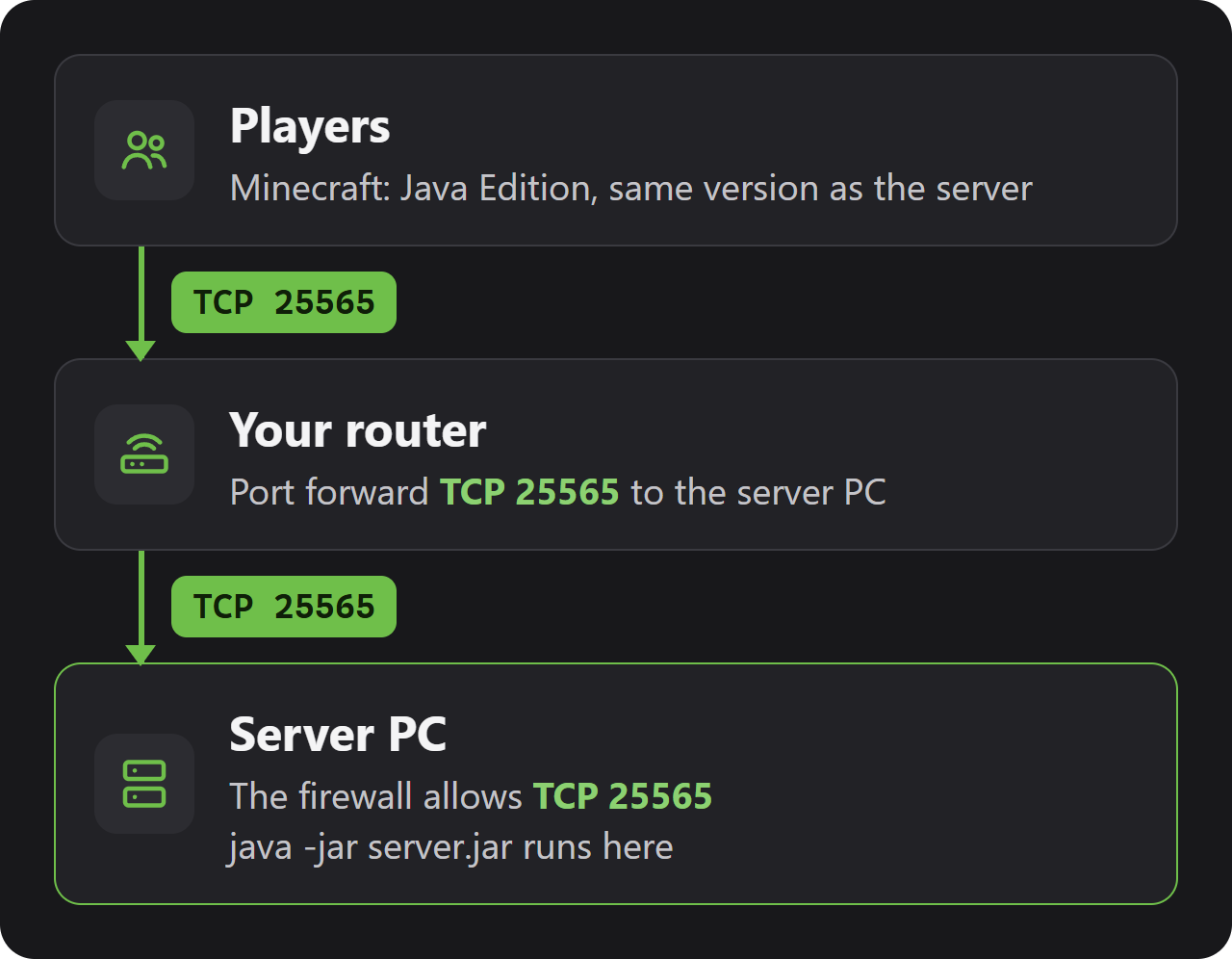
Players connect on TCP port 25565. If friends outside your home will join, forward that port on your router (see Ports and firewall below).
Checked with server version 26.3 and Java 25, 31 October 2026.
Install the server
1. Install Java 25. Mojang ships the Microsoft Build of OpenJDK with the game, and the same build works for the server. Pick the Windows x64 .msi of version 25.
2. Make a folder for the server, for example C:\minecraft-server, and save server.jar from the official download page into it.
3. Open PowerShell or Command Prompt and start it:
cd C:\minecraft-server
java -Xms4G -Xmx4G -jar server.jar nogui
4. The first start ends after a few seconds and leaves eula.txt behind. Open it, change eula=false to eula=true to accept Mojang's EULA, save, and run the java line again.
On Ubuntu 24.04, Java 25 is in the normal package sources. The server needs no graphical desktop:
sudo apt update
sudo apt install openjdk-25-jre-headless

mkdir ~/minecraft-server && cd ~/minecraft-server
# put server.jar from minecraft.net in this folder, then:
java -Xms4G -Xmx4G -jar server.jar nogui
Accept the EULA in eula.txt after the first start, as on Windows, and start again. To keep the server running after you log out, start it inside screen or tmux.
Mojang publishes no image of its own, but the official Eclipse Temurin Java image runs the plain server.jar from a folder on the host:
mkdir ~/minecraft-server && cd ~/minecraft-server
# put server.jar from minecraft.net in this folder, then:
docker run -d -it --name minecraft -p 25565:25565 \
  -v ~/minecraft-server:/server -w /server \
  eclipse-temurin:25-jre java -Xms4G -Xmx4G -jar server.jar nogui
After the first start, eula.txt appears in that folder: set eula=true and run docker start minecraft. docker attach minecraft opens the server console, and Ctrl+P followed by Ctrl+Q leaves it again without stopping the server.
First start and the files
When the console prints a line like Done (8.703s)! For help, type "help", the world is ready and players can join. On our test PC about half a minute passed between typing the java line and that message, for a new world and for a restart alike.
| File or folder | What it holds |
|---|---|
server.properties | All server settings (next section). |
eula.txt | eula=true once you accept Mojang's EULA. Without it the server will not run. |
world | The world. Its name comes from level-name. |
whitelist.json | Players allowed to join. |
ops.json | Operators: players who may use admin commands. |
banned-players.json, banned-ips.json | Bans. |
logs | One log file per start; latest.log is the current one. |
libraries, versions | Unpacked by server.jar on the first start. Leave them alone. |
Server settings
Stop the server, edit server.properties in a text editor, and start it again: the file is read at start-up. Each line is key=value. A few lines as an example:
motd=YOUR-SERVER-NAME
max-players=10
difficulty=normal
white-list=true
view-distance=10| Setting | Default | What it does |
|---|---|---|
motd | A Minecraft Server | The text under the server's name in the multiplayer list. |
max-players | 20 | How many players can be online at once. |
white-list | true | Only players on the whitelist get in. On by default since 26.3. |
enforce-whitelist | false | With true, players removed from the list are kicked at once. |
online-mode | true | Checks every player's Microsoft account. Leave it on. |
gamemode | survival | survival, creative, adventure or spectator for new players. |
difficulty | easy | peaceful, easy, normal or hard. |
hardcore | false | One life per player. |
level-name | world | Folder of the world. A new name makes a new world. |
level-seed | (empty) | Seed of a new world. Empty picks a random one. |
view-distance | 10 | How far players see, in chunks. Costs memory and CPU. |
simulation-distance | 10 | How far from players crops grow and mobs move, in chunks. |
spawn-protection | 16 | Blocks around spawn that only operators can change. 0 turns it off. |
pause-when-empty-seconds | 60 | The world stops ticking once nobody has been online this long. |
server-port | 25565 | The port players connect to. |
enable-rcon | false | Remote console on TCP 25575. Needs rcon.password. |
PvP, mob spawning and command blocks are no longer in this file: since 1.21.9 they are game rules, changed in the console with /gamerule, for example gamerule pvp false.
Whitelist and admin commands
From 26.3 on, the whitelist starts switched on and empty: the server turns everyone away, you as well, until you add names. Type these in the server console without a slash, or in the game chat with a slash once you are an operator:
whitelist add YOUR-PLAYER-NAME
op YOUR-PLAYER-NAME| Command | What it does |
|---|---|
whitelist add <player> | Lets a player join. |
whitelist remove <player> | Takes a player off the list. |
whitelist list | Shows who is on the list. |
whitelist off | Opens the server to everyone (on closes it again). |
op <player> | Makes a player an operator with all admin commands. |
deop <player> | Removes operator rights. |
kick <player> <reason> | Throws a player out once. |
ban <player> <reason> | Bans a player; pardon <player> lifts it. |
list | Shows who is online. |
save-all | Writes the world to disk now. |
stop | Saves everything and shuts the server down. |
End the server with stop: it saves the players and all three dimensions before it closes.
Ports and firewall
The game uses one port: TCP 25565, or whatever server-port says. Query (UDP) and RCON (TCP 25575) only open if you switch them on.
On Windows, allow the port once, in PowerShell as administrator:
New-NetFirewallRule -DisplayName "Minecraft Java server" -Direction Inbound -Protocol TCP -LocalPort 25565 -Action AllowOn Ubuntu with ufw: sudo ufw allow 25565/tcp. For friends outside your home, forward TCP 25565 on your router to the local IP address of the server PC.
Join the server
In Minecraft open Multiplayer, then Add Server. Give it any name, type the address and save; the server now stays in your list. Direct Connection joins once without saving it.
| Where the player is | Address to type |
|---|---|
| On the server PC itself | localhost |
| In the same home network | The local IP address of the server PC |
| Anywhere else | YOUR-SERVER-IP (your public IP address) |
Add :port to the address only when the server does not use 25565, for example YOUR-SERVER-IP:25570.
Saves, backups and updates
The whole world is the world folder next to server.jar. Since 26.1 it keeps the Overworld, the Nether and the End under dimensions/minecraft, and player data under players. Guides that mention DIM-1 and DIM1 describe the old layout.
The easy backup: run stop, then copy the world folder together with server.properties, whitelist.json and ops.json. To copy while players stay online, pause saving first:
save-off
save-all flush
(copy the world folder now)
save-on
To update, stop the server, back up, and swap server.jar for the latest download from minecraft.net. The world is upgraded on the next start. Players need the server's exact version, and a new major version can need a newer Java: 26.1 and later need Java 25.
Plugins, mods and data packs
The server.jar from Mojang runs the game as it is. Data packs work with it: put them in world/datapacks.
Plugins (Paper, Spigot) and mods (Fabric, NeoForge) need a different server program from those projects. Mojang does not make or support them, and they often arrive some days after a new Minecraft version.
Common problems
The server closes right after it starts
Look for You need to agree to the EULA in the console. Set eula=true in eula.txt and start again.
Friends get a message that they are not whitelisted
New servers have had the whitelist switched on since 26.3. Add each friend with whitelist add <name> in the console, or set white-list=false in server.properties and restart.
UnsupportedClassVersionError when starting
The PC runs an older Java. Minecraft 26.1 and newer need Java 25: install it and check with java -version.
The game says the server runs a different version
Players must use the server's exact version. Update the server, or let players pick the server's version under Installations in the launcher.
Friends outside my home cannot connect
Check that TCP 25565 is forwarded to the right local IP, that the firewall rule exists and that they use your public IP address. Some internet providers give homes no public IPv4 address (CGNAT); then forwarding does not work.
The server lags or runs out of memory
Raise -Xmx in the start line if the PC has the memory, and lower view-distance and simulation-distance in server.properties.
Questions
Is a Minecraft Java server free?
Yes. server.jar is a free download from minecraft.net. Only the players need to own Minecraft: Java Edition.
Which port do I forward for a Minecraft Java server?
TCP 25565. Forward it on your router and allow it in the firewall of the server PC.
How much RAM does a Minecraft server need?
Mojang's start line gives it 4 GB. Our test world ran on 2 GB with nobody online; give it more for many players or a large view distance.
Why can't my friends join my new Minecraft server?
Since version 26.3 a new server starts with its whitelist switched on. Add them with whitelist add <name> in the console.
How do I make myself an operator on my Minecraft server?
Type op followed by your player name in the server console.
Which Java version does a Minecraft server need?
Java 25 for Minecraft 26.1 and newer. Versions 1.20.5 to 1.21.11 run on Java 21.
Can Bedrock players join a Java server?
Not the plain server from Mojang: it only accepts Java Edition. Bedrock has its own server.
Wikily Servers hosts Minecraft
From €4.99 a month