
How to Make a Minecraft Bedrock Server
Run a Minecraft Bedrock world on your own PC that friends join from Windows, phones and tablets. Mojang gives Bedrock Dedicated Server away at no cost, as a Windows build and an Ubuntu Linux build.
What you need
A 64-bit PC with an Intel or AMD processor that stays on while people play: Windows 10 or 11, Windows Server 2016 or later, or Ubuntu 22.04 or later. Mojang supports no other Linux and no ARM computers.
Mojang lists 4 GB of RAM. Our test server with a new world and nobody online used under 0.4 GB; players, a long view-distance and add-ons all add to that.
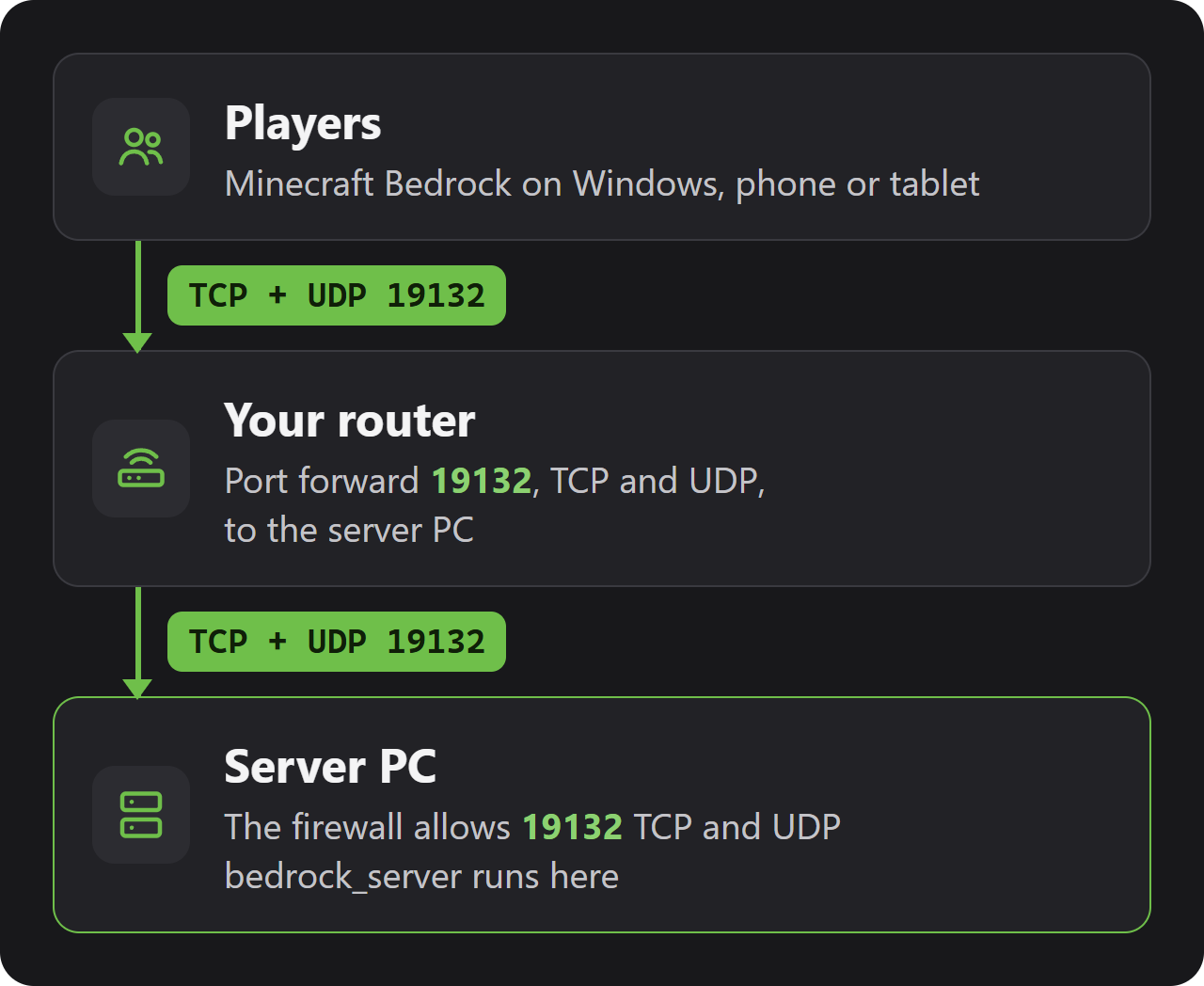
Players connect on port 19132, TCP and UDP. If friends outside your home will join, forward both on your router (see Ports and firewall below).
Checked with Bedrock Dedicated Server 1.26.61.1 (game version 26.60), 31 October 2026.
Install the server
1. Download the Windows zip from the page above and unpack it into a new folder with nothing else in it, such as C:\bedrock-server.
2. Double-click bedrock_server.exe, or run it from PowerShell inside that folder. A console window opens; the server is ready when it says Server started.
3. The first start brings up a Windows Firewall question. Allowing private networks covers players on your home network; friends coming in over the internet need public networks allowed as well.
Download the Ubuntu zip from the page above, then unpack and start it:
sudo apt update
sudo apt install unzip libcurl4

mkdir ~/bedrock-server
unzip bedrock-server-1.26.61.1.zip -d ~/bedrock-server
cd ~/bedrock-server
LD_LIBRARY_PATH=. ./bedrock_server
The server needs libcurl, which the apt line installs; LD_LIBRARY_PATH=. lets it find the libraries that come inside the zip. Run it inside screen or tmux to keep it going after you log out.
First start and the files
The console shows CREATING VANILLA WORLD on the very first start and LOADING VANILLA WORLD on every start after it. The server is ready when it prints Server started; on our test PC that took about five seconds.
Right after that comes an ALLOW LIST WARNING: the list is switched on and still empty, so nobody can join yet. That is the next thing to fix (see Allowlist and operators).
| File or folder | What it holds |
|---|---|
server.properties | All server settings (next section). |
allowlist.json | Players allowed to join. Empty in a new install. |
permissions.json | Operators, members and visitors by Xbox user ID. |
worlds | One folder per world; level-name picks the one that runs. |
keys | The server's identity key, once you save it (see below). |
behavior_packs, resource_packs | Packs that ship with the game. |
Server settings
Stop the server, change server.properties, start it again. The file explains every line in a comment below it. An example:
server-name=YOUR-SERVER-NAME
max-players=8
difficulty=normal
allow-list=true
online-mode=true| Setting | Default | What it does |
|---|---|---|
server-name | Dedicated Server | The name players see. No semicolons. |
max-players | 10 | How many players can be online at once. |
allow-list | true | Only players in allowlist.json get in. On by default since 26.30. |
online-mode | true | Players must sign in with a Microsoft account. Keep it on. |
gamemode | survival | survival, creative or adventure. |
difficulty | easy | peaceful, easy, normal or hard. |
allow-cheats | false | With false, commands such as /give are blocked in the game. |
level-name | Bedrock level | The folder in worlds that runs. A new name makes a new world. |
level-seed | (empty) | Seed of a new world. Empty picks a random one. |
default-player-permission-level | member | visitor, member or operator for new players. |
view-distance | 32 | How far players can see, in chunks (at least 5). |
tick-distance | 4 | How far around players the world keeps running, 4 to 12 chunks. |
player-idle-timeout | 30 | Minutes before an idle player is kicked. 0 never kicks. |
server-port | 19132 | The port players connect to. |
transport | nethernet | How the server talks to players. raknet is the old way and deprecated. |
texturepack-required | false | With true, players must use the world's resource packs. |
Allowlist and operators
With allow-list on and an empty list, nobody can join, not even you. Add every player by their Xbox gamertag in the server console; put names with spaces in quotes:
allowlist add YOUR-GAMERTAG
allowlist add "Name With Spaces"
The server fills in each player's Xbox user ID when they first join. To make someone an operator, they join once and you type op followed by their gamertag. The server then writes them into permissions.json.
| Command | What it does |
|---|---|
allowlist add <name> | Lets a player join. |
allowlist remove <name> | Takes a player off the list. |
allowlist list | Shows the list. |
allowlist reload | Reads allowlist.json again after you edited it by hand. |
op <name> | Makes a player an operator. |
deop <name> | Turns an operator back into a member. |
kick <name> <reason> | Throws a player out. |
changesetting difficulty <value> | Changes the difficulty until the next restart. |
stop | Saves the world and shuts the server down. |
The server's identity key
A Bedrock server has an identity key that players' games remember. A new install has no saved key, so the server invents a fresh one at every start and players are asked to trust the server again. Save it once in the console:
serveridentity saveThe server answers Saved server identity key to keys/server_identity_key.pem. Keep the keys folder in your backups and take it along when you update or move the server.
Ports and firewall
A current server uses port 19132 over TCP and UDP at the same time: TCP for setting up the connection, UDP for the game itself. Port 19133 matters only if you set transport=raknet.
On Windows, allow both in PowerShell as administrator:
New-NetFirewallRule -DisplayName "Minecraft Bedrock server TCP" -Direction Inbound -Protocol TCP -LocalPort 19132 -Action Allow
New-NetFirewallRule -DisplayName "Minecraft Bedrock server UDP" -Direction Inbound -Protocol UDP -LocalPort 19132 -Action Allow
On Ubuntu with ufw: sudo ufw allow 19132 (it opens TCP and UDP). For friends outside your home, forward 19132 TCP and UDP on your router to the local IP address of the server PC.
Join the server
Players add the server from the game's Play screen: on the Servers tab, scroll to the end of the list and pick Add Server. Enter any name, the address and 19132 as the port.
| Where the player is | Address |
|---|---|
| In the same home network | The local IP address of the server PC |
| Anywhere else | YOUR-SERVER-IP (your public IP address) |
Playing on the same Windows PC that runs the server is blocked by Windows until you allow it once. With the server stopped, open a terminal as administrator and run the line below; then start the server again and connect to 127.0.0.1:
CheckNetIsolation.exe LoopbackExempt -a -p=S-1-15-2-1958404141-86561845-1752920682-3514627264-368642714-62675701-733520436Saves, backups and updates
A world is a folder in worlds named like level-name, Bedrock level in a new install. For a backup, stop the server and copy that folder, plus server.properties, allowlist.json, permissions.json and the keys folder.
To copy the world while the server runs, ask it to hold its files:
save hold
save query
(copy the files it lists)
save resume
After save query the console says Files are now ready to be copied and lists every world file with a size. Copy those files, then save resume lets the world change again.
Mojang's instructions add that each copy should be cut to the listed size. Stopping the server and copying the folder avoids that step.
Every update is a new zip with a fresh server.properties, allowlist.json and permissions.json. Unpacked over your server, it resets your settings and your list of players.
So back up, unpack the new zip into a new folder, and copy your worlds, keys, server.properties, allowlist.json and permissions.json into it. New versions sometimes add lines to server.properties: compare the two files.
Common problems
Nobody can join, not even me
allow-list is on and allowlist.json is empty. Add each player with allowlist add <gamertag> in the console.
Players see Outdated server
The game was updated and the server was not. Download the new zip from minecraft.net and update as described above. Outdated client means the player's game is older than the server.
Players have to accept the server again after every restart
Run serveridentity save once, so the server keeps its key.
I cannot join from the PC that runs the server
Windows blocks it by default. Run the CheckNetIsolation line from Join the server once.
Friends outside my home cannot connect
Forward 19132 for both TCP and UDP, allow both in the firewall, and check that they use your public IP address. Some internet providers give homes no public IPv4 address (CGNAT); then forwarding does not work.
Questions
Does Bedrock Dedicated Server cost anything?
No. Bedrock Dedicated Server is a free download from minecraft.net for Windows and Ubuntu.
Which port do I forward for a Minecraft Bedrock server?
19132, TCP and UDP. You need 19133 as well only if you switch to transport=raknet.
Why can't anyone join my new Bedrock server?
The allowlist is on by default. Add players with allowlist add <gamertag> in the console.
How do I become operator on my Bedrock server?
Join once, then type op followed by your gamertag in the server console.
Does the Bedrock server run on ARM, like a Raspberry Pi, or on macOS?
Not the official one. It is built for 64-bit Intel and AMD processors, on Windows or Ubuntu.
Can Java players join a Bedrock server?
No. Java Edition has a server of its own.
Wikily Servers hosts Minecraft Bedrock
From €4.99 a month