Modular Roof Windows

Workshop stats
Lifetime subscribers
Current subscribers
Lifetime favorites
Views
File size
Last updated
Published
Screenshots

Mod description
🎥 Watch NickNutNow on YouTube →
The Sims · Paralives · Life Sim Content
Modular Roof Windows
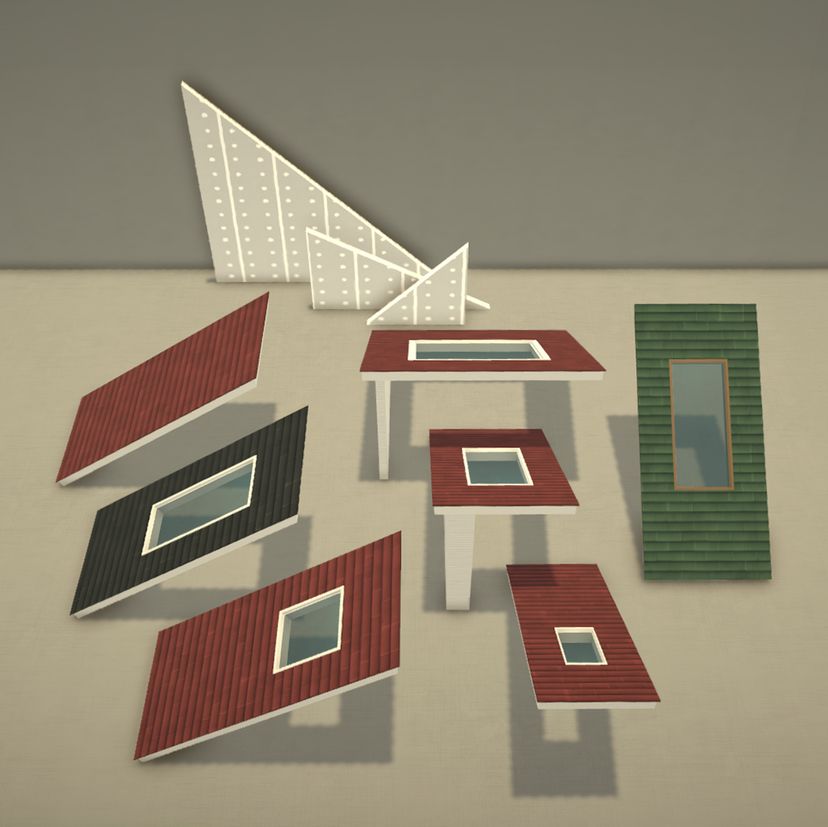
Turn the space under your roof into a real room. This mod adds a sloped roof based on the base-game single-slope Pinino, without the walls underneath it, plus integrated roof windows that bring daylight into your attic, loft or sunroom.
Included
- Pinino Loft – sloped roof with integrated roof window, always visible
- Pinino Loft Toggle Version – the same roof, hiding with the wall toggle
- Pinino Loft Wall – matching triangular inner wall to divide the space under the roof, always visible
- Pinino Loft Wall Toggle Version – the same inner wall, hiding with the wall toggle
All four can be found in Build Mode under Roofs.
Pinino Loft
- Same shape, shingles and resizing as the base-game Pinino, without the blocking walls underneath
- Roof window in the style of the base-game Chani window, with transparent glass
- 3 default window options: standard, long (double length) or no window
- The window resizes automatically with the roof
- 7 end options: open, closed, open left or open right, with 14 cm (5.5 inch) or 35 cm (14 inches) side walls
- Clean, continuous roof ceiling inside that takes any wall paint
- 4 recolor/retexture options: Roof, Exterior Walls, Interior, Trim
- Inside and outside of the side walls can be painted separately
Pinino Loft Wall
- Follows the exact slope of the Pinino Loft: give it the same depth and height as your roof
- Adjustable thickness (14 cm by default and can be widened)
- 2 recolor options: Side A and Side B
Toggle Versions
Both the roof and the Loft Wall come in a Toggle Version with the same options and colors, which reacts to the wall toggle so you can look inside while decorating (check my demo video):
Use the regular versions when you want the roof or wall to always stay visible, and the Toggle Versions when you want them out of the way. You can mix both in one build.
Tips
- Furniture under the slope the space is fully usable, but depending on the roof's inclination some objects may become unusable or unreachable for your Para. See the screenshots for suitable distances and inclinations.
- Beds keep the headboard about 50 cm (20 in) away from a 50 cm high lower wall.
- Sofas most are more flexible and stay usable even close to the lower wall.
- Testing placement I like to place objects with Advanced Toggling and test them with my Para before deciding on the final spot.
- Loft Wall finish textured or patterned wallpapers may look distorted or misaligned, so painted walls give the most consistent result. Feel free to experiment.
- Loft Wall Toggle Version in cutaway: the wall hides when the camera is on its Side B, so face Side A toward the room you want to look into.
- Doors doors can't be placed in a Loft Wall itself, but you can connect it to a 1 m straight wall section and place the door there.
- Ceiling lamps, wall deco, and hanging plants: place them on a flat ceiling/wall first, then use Advanced Toggling to move them beneath the sloped roof.
Info
- Default size 1.5 × 3.5 grids, 2.6 m high (102 inches)
- Left and right end options are as seen from the low edge of the roof
- The Toggle Versions hide as a whole (the roof including its window and ceiling)
- The base-game Pinino roof is not changed
- Base game only – no other mods required
Written by the mod author on the Steam Workshop and shown in its original language.
More mods of this type
The most subscribed mods with the same Workshop tag. The number on each card is its lifetime subscribers.