Skip to content
WikilyWIKILY
All games29 Wikis · pick your game
BuildShops and facilities

Switch game

29 Wikis · pick your game
Planet Zoo 2 in the Wikily appFree · 4.4★4.6★ · Full screenGet appGet app
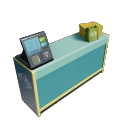
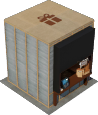
Modular Souvenir Shop

Modular Souvenir Shop

Souvenir shop

Type

Souvenir shop

Build cost

$2,000

Items sold

12

Building options

  • Counter $2,000
  • Balloon Display $15
  • Island Shelf Display Corner $15
  • Island Shelf Display $15
  • Tall Shelf Display 01 Corner $15
  • Tall Shelf Display 02 Corner $15
  • Small Shelf Display $15
  • Tall Shelf Display 01 $15
  • Tall Shelf Display 02 $15
  • Tall Hanging Display $15
  • Poster Display $15

Requirements

  • Power
  • Path
  • A vendor per counter
  • Display shelves

Items sold

  • Animal Balloons

    Price
    $13.70
    Unit Cost
    $3.30

    Happiness

  • Balloons

    Price
    $7.90
    Unit Cost
    $2.40

    Happiness

  • Caps

    Price
    $18.40
    Unit Cost
    $3.90

    Happiness

  • Jigsaws

    Price
    $7.90
    Unit Cost
    $2.40

    Happiness

  • Masks

    Price
    $13.70
    Unit Cost
    $3.30

    Happiness

  • Mugs

    Price
    $9.60
    Unit Cost
    $2.70

    Happiness

  • Plushies

    Price
    $13.70
    Unit Cost
    $3.30

    Happiness

  • Posters

    Price
    $7.90
    Unit Cost
    $2.40

    Happiness

  • Statues

    Price
    $13.70
    Unit Cost
    $3.30

    Happiness

  • T-shirts

    Price
    $13.70
    Unit Cost
    $3.30

    Happiness

  • Tote Bags

    Price
    $4.90
    Unit Cost
    $1.80

    Happiness

  • Umbrellas

    Price
    $5.50
    Unit Cost
    $1.25

Staff

How it works

Scenery Rating Nearby scenery increases guest happiness gain from purchases.

Guest Experience reflects guests’ enjoyment of the zoo, and is made up of average guest happiness, scenery rating, and the number of species in the zoo.

Join the creator communityThe people who build the Planet Zoo 2 wiki are on our Discord. Ask questions, suggest pages or help build it with us.Join Discord (opens Discord in a new tab)