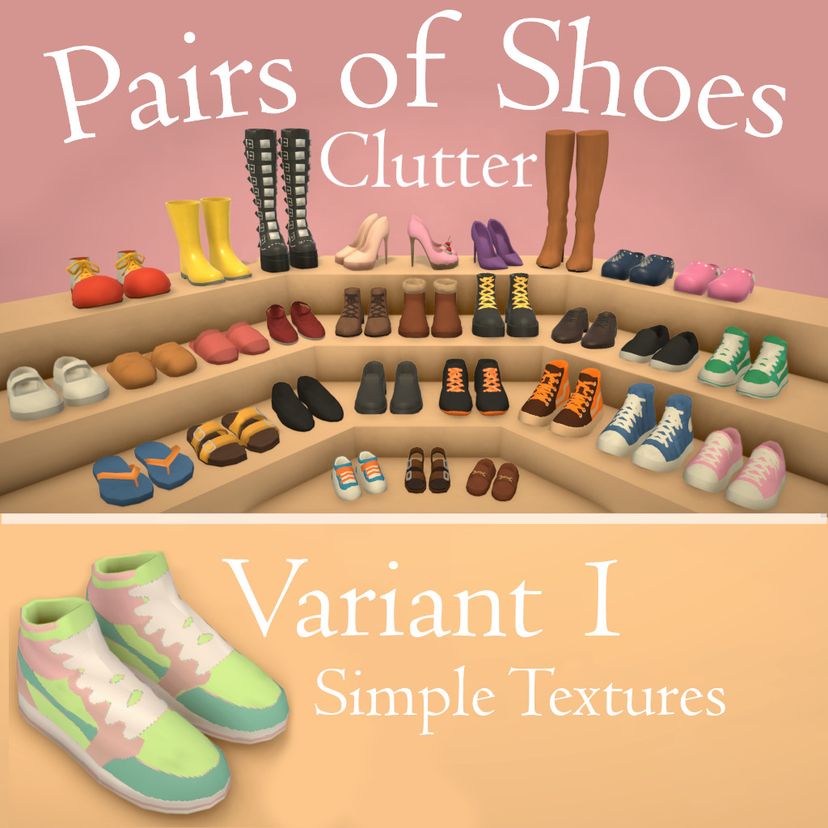
Shoes Clutter Variant 1 Simple Textures

ワークショップの統計
累計購読者数
現在の購読者数
累計お気に入り数
閲覧数
ファイルサイズ
最終更新
公開日
スクリーンショット

MODの説明
Decorate your Para’s home with their favourite shoes! This mod adds the base game shoes as clutter objects in the clothing category. They’re organized in 8 variant groups and will get the color swatches you create in the Paramaker.
In this Version the shoes will have simple textures without any harsh lines to blend in more with the environment. The alternative version with detailed textures suffers from the white texture bug and requires a manual installation. You can find it here: https://steamcommunity.com/sharedfiles/filedetails/?id=3749408147 You can use both versions at the same time.
Meshes and Textures were made by Paralives. Editing done by me.
Do I need to move this mod to the local mod folder?
No, this is no longer necessary. Don’t forget to delete the old version in your local mod folder!
Why do the textures suddenly look different?
With the update (22nd June) I changed the textures to premade object textures, so the white texture bug will no longer haunt you. Since most players (and me) want a mod that just works, I figured shoes with simple textures are better than no shoes at all. After getting used to it I kinda think they’re also a better match for the style of the environment.
MODの作者がSteamワークショップに書いたもので、原文のまま表示している。