
How to Host a Rust Dedicated Server
Run your own Rust server with the map size, wipe days and rules you pick. Facepunch's server program is free and runs on Windows and Linux.
What you need
A Windows or Linux PC that stays on while people play, plus SteamCMD, Valve's free command-line downloader for Steam servers. Rust's server is Steam app 258550, a 6.1 GB download with an anonymous login, so the server PC needs neither Rust nor a Steam account.
Every player needs their own copy of Rust on Steam. On the server side, Facepunch's minimum is 12 GB of RAM to spare and 15 GB on disk, ideally an SSD; big maps raise both.
For scale: on our test PC a 1000 m world, empty of players, settled at about 2.8 GB of RAM and took 3 minutes 18 seconds to be ready. A full-size map takes longer and needs more.
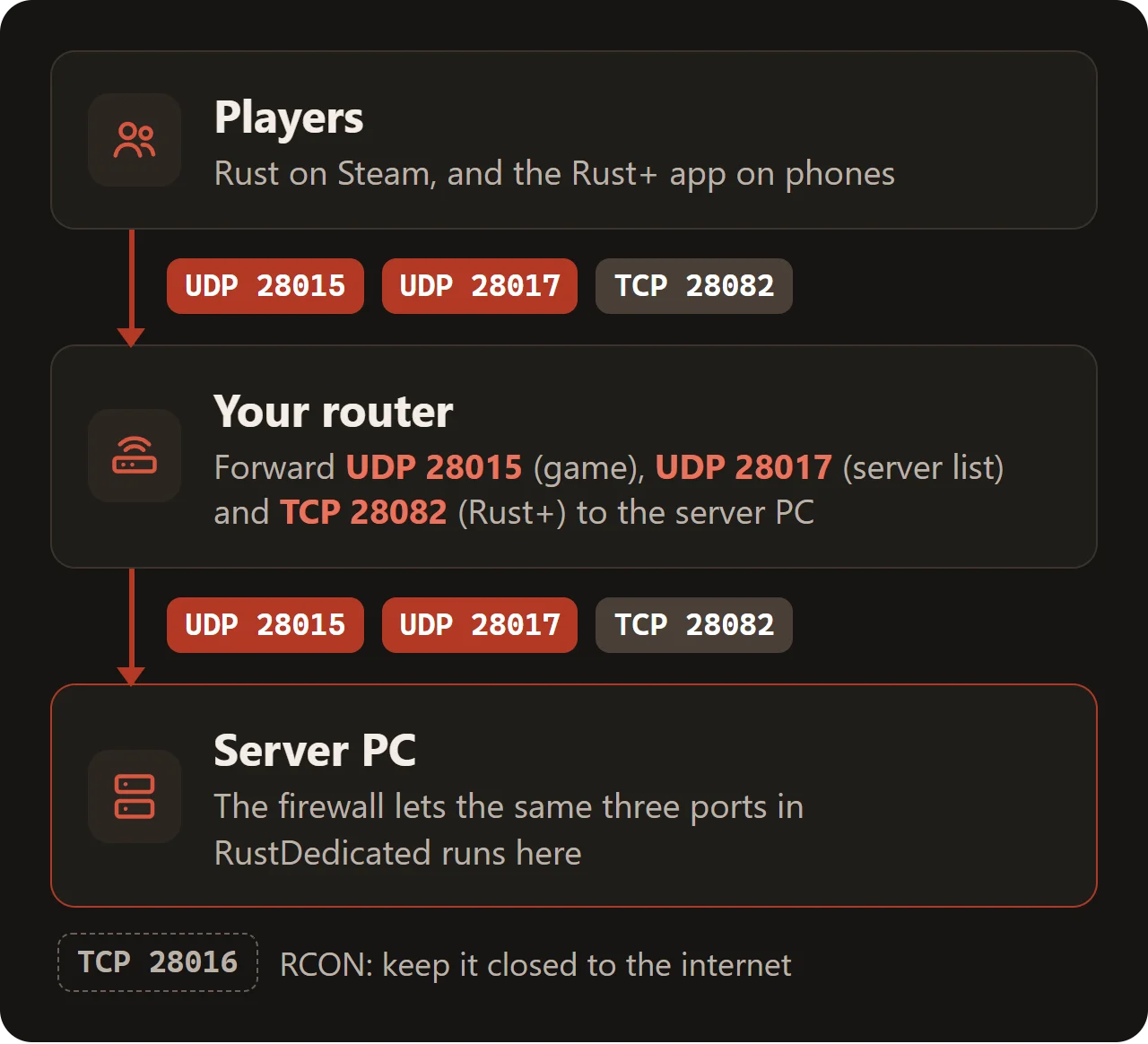
Playing needs one open port, UDP 28015. The server list and the Rust+ phone app use two more, covered under Ports and firewall.
Checked with the Rust server build of 22 October 2026 (protocol 2635.289.1).
Install the server
1. Download SteamCMD from Valve and unzip it to C:\steamcmd.
2. Open PowerShell or Command Prompt and fetch the server into C:\rust-server:
C:\steamcmd\steamcmd.exe +force_install_dir C:\rust-server +login anonymous +app_update 258550 validate +quit3. Rust's start line is long, so keep it in a file. Save this as C:\rust-server\start-server.bat and double-click it:
cd /d "%~dp0"
RustDedicated.exe -batchmode +server.identity main +server.port 28015 +server.queryport 28017 +rcon.port 28016 +rcon.password "YOUR-ADMIN-PASSWORD" +rcon.web 1 +app.port 28082 +server.hostname "YOUR-SERVER-NAME" +server.maxplayers 60 +server.worldsize 3500 +server.seed 90817 -logfile server-log.txt
Loading takes a few minutes. Players can join once the window prints Server startup complete.
We tested these steps on Ubuntu 24.04. SteamCMD from Valve needs the 32-bit GCC library (lib32gcc-s1); without it, steamcmd.sh stops at once.
sudo apt update
sudo apt install lib32gcc-s1 curl screen

mkdir -p ~/steamcmd && cd ~/steamcmd
curl -sSL https://steamcdn-a.akamaihd.net/client/installer/steamcmd_linux.tar.gz | tar xz
./steamcmd.sh +force_install_dir ~/rust-server +login anonymous +app_update 258550 validate +quit
Start the server in a screen session, so it keeps running when you log out:
cd ~/rust-server
export LD_LIBRARY_PATH=~/rust-server:~/rust-server/RustDedicated_Data/Plugins/x86_64
screen -S rust ./RustDedicated -batchmode +server.identity main +server.port 28015 +server.queryport 28017 +rcon.port 28016 +rcon.password "YOUR-ADMIN-PASSWORD" +rcon.web 1 +app.port 28082 +server.hostname "YOUR-SERVER-NAME" +server.maxplayers 60 +server.worldsize 3500 +server.seed 90817 -logfile server-log.txt
Keep the export line. The server loads Steam's steamclient.so from its own folder only when that folder is on LD_LIBRARY_PATH. Without it, ours built the map and then quit with Failed to load module steamclient.so.
Ctrl+A and then D leaves the session; screen -r rust brings it back. The Linux console does not accept typed commands, so use RCON for admin work (see Admin).
Facepunch does not publish a Docker image. Our test ran the Linux steps above as root in a plain ubuntu:24.04 container, export line included.
The start line
Each +name value pair in the start line sets one console variable (convar) before the world loads. Leave one out and the server uses its default:
| Option | Default | What it does |
|---|---|---|
-batchmode | Runs the server without graphics. Always include it. | |
+server.identity | my_server_identity | Name of the folder under server/ that holds this server's save and settings. A second identity gives a second, separate server from the same install. |
+server.port | 28015 | Game port, UDP. Players connect to this one. |
+server.queryport | 28016 | UDP port the server list uses. It may not be the game port. |
+rcon.port | 28015 | Remote console, TCP. |
+rcon.password | (none) | Password for the remote console. Choose a long one of your own. |
+rcon.web | 1 is WebSocket RCON, the kind Facepunch recommends and its web console uses. | |
+app.port | 28082 | TCP port of the Rust+ companion app, 10000 or higher. |
+server.hostname | My Untitled Rust Server | Name in the server list. |
+server.maxplayers | 500 | Most players online at once. |
+server.worldsize | 4500 | Map size, 1000 to 6000. Bigger maps load slower and use more RAM. |
+server.seed | 1337 | Number (0 to 2147483647) the map is generated from. |
-logfile | Copies the console output into a file. | |
Defaults as our test server reported them in its log and over RCON. Without +server.seed, every server builds the same seed 1337 map.
Server settings
Settings that should survive every restart go into server.cfg, in server\main\cfg inside the server folder (main being your server.identity). Write one convar per line, without the +.
The first start creates the cfg folder with users.cfg, bans.cfg and serverauto.cfg, a file the server writes itself. server.cfg is not there until you make it.
server.tags biweekly,softcore,EU
server.description "YOUR-SERVER-DESCRIPTION"
server.url "https://YOUR-WEBSITE"
server.headerimage "https://YOUR-WEBSITE/header.png"
server.pve false
decay.scale 0.5
The server reads server.cfg at every start. In our test, a convar set both there and in the start line kept the start line's value; the other lines of server.cfg applied. The server never writes into server.cfg itself.
| Convar | Default | What it does |
|---|---|---|
server.description | No server description has been provided. | Text on the screen players see before they join. |
server.url | (empty) | Website link on that screen. |
server.headerimage | (empty) | Link to the banner image on that screen. |
server.tags | (empty) | Filter tags for the server list, separated by commas. |
server.pve | False | PvE mode. Setting it to true also adds the pve tag. |
decay.scale | 1 | Multiplier for how fast buildings decay. |
server.saveinterval | 600 | Seconds between automatic saves. |
Tags help players filter the list. Choose at most one wipe tag (weekly, biweekly, monthly), one style tag (vanilla, softcore, hardcore) and a region: NA, SA, EU, WA, EA, OC or AF.
Extras are pve, roleplay, creative, minigame, training, battlefield, broyale, builds, tut and premium. Two tags from one group can keep the server out of filtered searches.
To see the current value of any convar, type its name alone in the server console or over RCON.
Admin
Rust knows two ranks: owner and moderator. Give them in the server console or over RCON, with the player's 17-digit SteamID64. The status command lists everyone online with their ID:
ownerid YOUR-STEAMID64 "YOUR-NAME"
moderatorid A-FRIENDS-STEAMID64 "A-FRIENDS-NAME"
The player then reconnects. Both commands write the rank to cfg/users.cfg straight away; ours held the two lines before server.writecfg ran. removeowner and removemoderator take a rank away.
In the game, admins open the console with F1 and type commands there.
| Command | What it does |
|---|---|
status | Shows the players online with their SteamID64. |
say <text> | Sends a message to everyone in chat. |
kick <player> <reason> | Throws a player off the server. |
ban <player> <reason> | Bans a player who is online. |
banid <SteamID64> <name> <reason> | Bans by ID, also players who are offline. |
unban <SteamID64> | Lifts a ban. |
server.save | Saves the world now. |
server.writecfg | Writes the admins and bans to the cfg folder. |
quit | Saves and stops the server. |
For admin work from another PC, Facepunch's web console at facepunch.github.io/webrcon connects to the RCON port with your RCON password. That page is plain HTTP.
Ports and firewall
Players reach the game over UDP 28015. The server list reads the server's details over the query port, and the Rust+ app talks to the server over TCP. With the start line above that makes three ports: UDP 28015, UDP 28017 and TCP 28082.
Without +server.queryport, the server list port is one above whichever is larger, the game port or the RCON port. Our test server without rcon.port answered the list on UDP 28016.
Allow them through Windows Firewall, in PowerShell as administrator:
New-NetFirewallRule -DisplayName "Rust server (UDP)" -Direction Inbound -Protocol UDP -LocalPort 28015,28017 -Action Allow
New-NetFirewallRule -DisplayName "Rust server (Rust+)" -Direction Inbound -Protocol TCP -LocalPort 28082 -Action Allow
On the router, forward the same three ports to the server PC and give that PC a fixed local IP. Pick UDP or TCP for each rule rather than a both setting. RCON (TCP 28016) needs no forward unless you manage the server from outside your home.
Rust+ companion app
Rust+ pairs phones with the server over app.port. Without +app.port, our test server used TCP 28082. The port has to be 10000 or higher, and a change needs a restart.
At boot the server checks that Rust+ can reach it from outside. If that check fails, Rust+ is switched off; our test server, with no ports open, logged Rust+ companion server connectivity test failed. The server also needs to reach companion-rust.facepunch.com.
If Rust+ shows the wrong address, set app.publicip to YOUR-SERVER-IP. To switch Rust+ off, put +app.port 1- in the start line; the minus goes after the 1 there.
The file companion.id in the identity folder is the server's Rust+ identity. Never delete it or give it to another server: every player would have to pair again, and a deleted file cannot be brought back.
Join the server
In Rust's main menu, press F1 and type:
client.connect YOUR-SERVER-IP:28015On the same network as the server, use its local IP address instead (ipconfig shows it). Once the query port is open, the server is also listed under Community in the server browser, or under Modded if it runs plugins that change the game.
Saves, wipes and updates
Everything one server keeps is in server\main. After a start and a save, ours held:
| File | What it holds |
|---|---|
proceduralmap.1000.90817.289.sav | The world: buildings, items and everything placed. 289 comes from the protocol number. |
….sav.1 | The previous save. The server keeps two older copies (server.savebackupcount 2). |
proceduralmap.1000.90817.289.map | The generated map, named after size, seed and protocol. |
.navmesh, _occlusion_3.dat | Data the server builds from the map for AI paths and visibility. |
player.blueprints.18.db | Blueprints players have learned. |
player.deaths, .identities, .states | Player records, one .db file each. |
player.tokens.db | Rust+ pairings. |
clans.289.db, relationship.289.db | Clans and player relationships. |
sv.files.289.db | Images on signs and other drawable items. |
companion.id | The server's Rust+ identity. |
cfg/ | users.cfg, bans.cfg, serverauto.cfg and your server.cfg. |
*.db-wal | Recent changes to the .db file next to it. Copy them together. |
For a backup, run server.save, stop the server and copy the whole identity folder, the -wal files included. Put it back only on the same server, because of companion.id.
Wipes
A wipe starts a server over. Facepunch's monthly update raises the protocol number in the save names, so the server makes a new map by itself: that is the forced wipe. Do not rename an old .sav to get around it.
To wipe the map yourself, stop the server and delete the .sav and .map files, or change server.seed. For a blueprint wipe, also delete player.blueprints at the same time.
The in-game wipe countdown defaults to Thursday at 19:00, London time. Change it with wipetimer.wipeDayofWeek (0 is Sunday, 4 Thursday), wipetimer.wipeHourofDay and wipetimer.wipeTimezone.
Updates
Rust's server does not update itself. After a game patch, stop it and run the SteamCMD line from the install step again: it keeps the save and the cfg folder. Until then, players with the new build cannot join.
Plugins and mods
Plugins run on a community framework, Oxide (uMod) or Carbon. Facepunch documents both but makes neither. For Oxide, stop the server, unpack the Rust build from umod.org over the server folder and start again. Plugins go into oxide/plugins.
Each SteamCMD update overwrites Oxide's files, so install Oxide again after every update. Oxide usually releases a matching build soon after a Rust patch.
Facepunch wants servers whose plugins change gameplay or add interface (gather rates, kits, info panels) listed as Modded. Admin tools, anti-cheat, chat cosmetics and changes to vanilla convars may stay in Community. Breaking the rules can get a server removed from the list.
Common problems
Friends cannot connect
Wait for Server startup complete. Check that UDP 28015 is forwarded to the right local IP and allowed in the firewall. From inside your own network, connect to the local IP instead.
The server does not show up in the server list
Forward the query port (UDP 28017 with our start line) and keep it different from the game port. A server that is still loading is not listed yet.
A setting in server.cfg has no effect
Check the start line. When a convar is in both places, the start line's value wins; on our test server, maxplayers and hostname from server.cfg were ignored for that reason. Keep each convar in one place.
Players get a message that the server needs an update
Rust got a patch and the server did not. Stop it, run the SteamCMD line again, then reinstall Oxide or Carbon if you use them.
Plugins stopped working after an update
SteamCMD replaced Oxide's files with the plain game files. Install the newest Oxide build again.
Rust+ will not pair
app.port must be 10000 or higher and forwarded as TCP. Look in the log for the Rust+ check at boot, set app.publicip if the address is wrong, and keep companion.id where it is.
The server crashes while it loads the map
It is short of memory. Facepunch asks for 12 GB of free RAM; a smaller server.worldsize needs less.
SteamCMD stops before the download starts
The line is missing +login anonymous. Add it before +app_update. Without it, our SteamCMD ended with Failed to request app info update.
The Linux server quits with Failed to load module steamclient.so
Run the export line from the start step in the same shell before ./RustDedicated, so the server finds the steamclient.so in its own folder.
Questions
Do I need to own Rust to host a Rust server?
No. SteamCMD downloads the server with an anonymous login. Each player needs Rust on Steam.
Which port do I forward for a Rust server?
UDP 28015 to play. Add UDP 28017 to appear in the server list and TCP 28082 for Rust+, with the start line on this page.
How much RAM does a Rust server need?
Facepunch asks for at least 12 GB free. Our small 1000 m test map used about 2.8 GB with nobody online; bigger maps and more players need more.
How do I make myself admin on my Rust server?
Run ownerid with your 17-digit SteamID64 and a name, in the server console or through RCON, and join again. In the game, the console is on F1.
Can I set a password on a Rust server?
Not in plain Rust: there is no join password. On our test server, find password listed only RCON settings. Limiting who may join takes a plugin.
When do Rust servers wipe?
Facepunch forces a map wipe with its monthly update, usually the first Thursday of the month. Between those, you wipe whenever you like by deleting the save.
Can I run a Rust server on Linux?
Yes. The server ships for Linux too. We tested it on Ubuntu 24.04.
Wikily Servers hosts Rust
From €10.99 a month