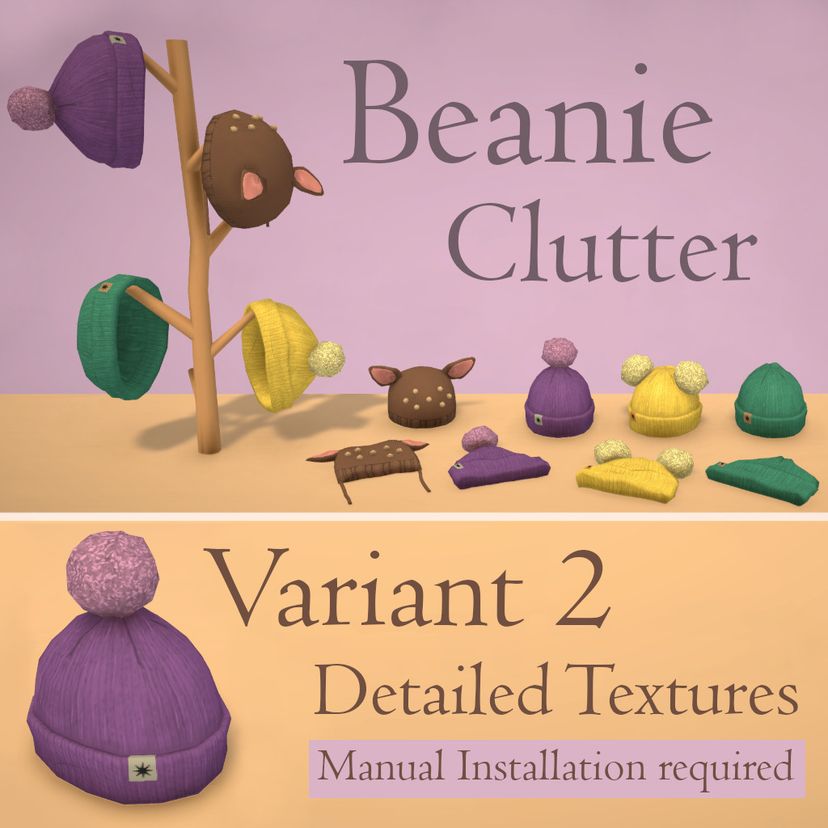
Hats Beanie Clutter Variant 2 Detailed Textures

Estatísticas da Oficina
Inscritos no total
Inscritos atuais
Favoritos no total
Visualizações
Tamanho do arquivo
Última atualização
Publicado
Capturas de tela

Descrição do mod
------Manual installation required!------
I recommend my alternative Version without manual installation to most players: https://steamcommunity.com/sharedfiles/filedetails/?id=3753135412
Time for some hats clutter! This mod adds the base game beanies as clutter objects in the clothing category. Every beanie has four variants (Original, Flat, Wall with snap, Wall without snap for free placement) and they will get the color swatches you create in the Paramaker. I also implemented the “Select alternate version” option (the pencil button), so you can easily change the beanies without needing to place them again.
Differences between the two versions
In this version the beanies will have the same textures as the ones in the Paramaker, but the mod suffers from the white texture bug. The alternative version uses simple textures and will work without any hassle. You can use both versions at the same time.
The textures appear white
There’s currently a bug which prevents the game to load custom made surfaces with graymask textures. To fix this you need to move this mod into your local mod folder. However, the game will remember the textures only in the current save file (the one you load with the “continue” button). So after loading a different save using this mod, saving and restarting the game a second time will be needed.
I don’t recommend this mod to players who switch saves regularly.
Installation guide
You need to move the mod to your local mod folder. This installation guide is written for windows. You should be able to follow these steps for mac as well, the folder names are different there. (I reused the pictures from a different mod)
Step 1 Locate the mod in the steam workshop folder
The easiest way to find the mod location is to use the in-game tools. First start the game. Click in the main menu on mods and see a list of your installed mods. (Sometimes they don’t show up in there, this is a bug!). Find the mod in the list and click on the “Show mod folder in explorer” button. You’ll likely find your downloaded mod here: C:\Program Files (x86)\Steam\steamapps\workshop\content\1118520\... Go one folder up to now see the “HatsBeanieClutterVariant2.mod” folder. You will need to move this one later. Minimize the window for now but leave it open.
Step 2 Locate your local mod folder
Using the same method, you can locate your local mod folder. At the top of your mods list you find a nameless local mod. Click “Show mod folder in the explorer”, go one folder up, and you’ll be in your local mod folder, most likely in C:\Users\***Your user name***\AppData\LocalLow\Paralives\Paralives . Leave this window also open.
Sometimes windows hides the appdata folder. You can unhide it by clicking in the file explorer at the top on “view” -> “show” -> “hidden items”.
Step 3 Exit the game and move the mod
Exit the game (!) and move (=cut an paste) “HatsBeanieClutterVariant2.mod” from the workshop folder to the local mod folder.
Step 4 Unsubscribe the mod
Unsubscribe the mod to prevent steam from redownloading.
After the next restart the items may appear still white. Save (!) and restart the game a second time and now the items should appear with their textures and be recolorable.
How to uninstall
Unsubscribe the mod in steam and delete the mod in the local mod folder.
Meshes and textures were made by Paralives. Editing done by me. Let me know about issues!
Escrita pelo autor do mod na Oficina Steam e exibida no idioma original.
Mais mods deste tipo
Os mods com mais inscritos que têm a mesma tag da Oficina. O número em cada cartão é o total de inscritos.