Empty Witchy Mansion

Statistiques du Workshop
Abonnés au total
Abonnés actuels
Favoris au total
Vues
Taille du fichier
Dernière mise à jour
Publié
Captures d'écran

Description du mod
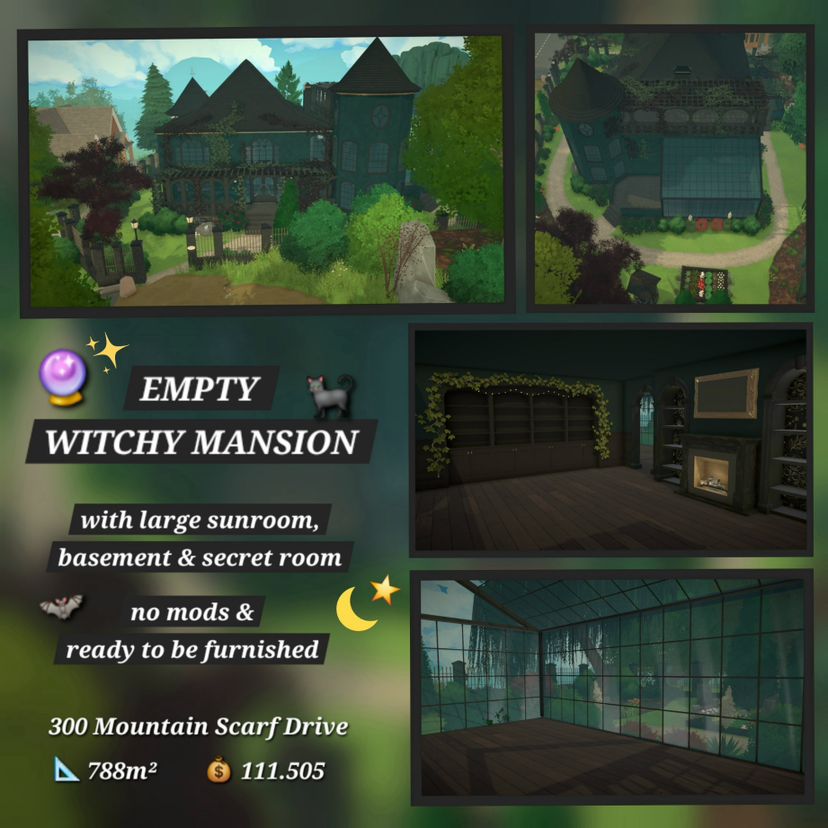
My “Witchy & Celestial Mansion” as an (nearly) empty building, so you can get creative and furnish it exactly to your taste! 🎨
No mods are required for this lot, so you have complete freedom to design it however you like!
📐💰 The house is located at 300 Mountain Scarf Drive, has 2 stories, a basement with a secret room and little dungeon, a large sunroom and an attic with access to a large loggia/balcony. It covers 788 square meters and costs 101.505 (nearly) unfurnished. As always, I recommend clearing the lot before placing the house (and there are a few more important informations for placing the lot below!)
_________________________________________________________________
❗❕📢 IMPORTANT INFORMATION ABOUT THE DOWNLOAD 📢❕❗
❗ PLACING THE LOT ❗
This is the first time I’ve worked with different terrain elevations and built a basement. This could cause problems when placing the lot on the first try, since similar errors have sometimes occurred with other lots even without a basement.
So, just to be safe: clear and level the lot before placing it! If you still encounter problems after placing the lot, such as walls not appearing or similar issues, you can do the following:
Scroll out into the town overlook. Click on the placed house, use the placing option (Cross-Key-Icon) and hold down the Shift key while moving the mouse up or down to adjust the vertical position (height) of the entire building. Often, the walls will suddenly appear at the right position once the house reaches the correct height relative to the ground. Alternatively: Click on a sunken wall segment (provided the furniture in the room is aligned) and use the height slider to slightly adjust the wall height - this often forces the game to recalculate and display the walls.
❗ CONTENTS ❗
I’ve uploaded patterns and images to the game for the special wallpapers (in the cabinets). Everything in my uploads (except mods) that is not included in the base game is just an example of what the game can do, and unfortunately it is not included in the download. However, you can use this feature yourself by adding pictures that suit your taste or resemble the patterns. The wallpapers should appear white for you, all you have to do is click on them and scroll down to the + button at the end of the listed pictures to add your own pictures directly from your computer.
I also kept a few realistic details, such as electrical outlets, light switches, some outdoor lightning as well as all the built-in furniture (like wall cabinets and the benches in front of the windows made from nightstands). I also left a few objects from the hidden menu on the lot, which normally requires the “Debug Objects Category” mod to access, such as mushrooms and the well. So I’m not sure if these objects actually appear without using the mod - please let me know in the comments if it works! But even if they don’t, the house is still fully functional and usable, the only things that would be missing are some decor that you can’t normally access.
_________________________________________________________________
If you like it I'd really appreciate it if you could give it a thumbs-up here ❤🔁 so that even more players can discover this house 🔎💡 And if you want to post about it, feel free to tag me on Instagram, where I create gaming content under the username flavia.foresta. I’d love to see how you set it up! 🙏🏼
Best wishes and have fun!
Flavia 🦆🧡
Rédigée par l'auteur du mod sur le Steam Workshop et affichée dans sa langue d'origine.
Autres mods de ce type
Les mods les plus suivis avec la même étiquette du Workshop. Le nombre sur chaque carte indique ses abonnés au total.