
Enshrouded Connection Lost and Disconnects
Why Enshrouded sends players back to the menu, what players can change on their side, and the server setting that lets players connect straight to the server.

The short answer
Enshrouded ends a session when no data has reached it for about 10 seconds. A connection that keeps losing data, most often Wi-Fi or a long route to a far-away server, runs into that limit.
A cable instead of Wi-Fi and a server close to the players fix most cases. Server owners can also turn on Direct connection (below).
Rubber-banding after lag spikes: Wikily Servers tuned Enshrouded's network settings so a player's connection never drops below 384 KB/s. The game's own setting lets it fall to 96 KB/s.
Checked with Enshrouded 1.0, November 2026.
The messages
| On screen | What it means |
|---|---|
| Lost connection to the server. | The session ended while you were playing: data stopped getting through. |
| You have been disconnected from the server. | The session ended while you were playing. |
| Server overloaded: / High server load: | A warning while you play. Movement can stutter or snap back. |
| The server is full or unavailable. | When joining: the server is full, offline or cannot be reached. |
| The build version of this server is older than yours. | The game updated and the server has not yet. |
What we see on our servers
We looked at 242 player connections on our Enshrouded servers in November 2026. Whether a player lost a lot of data depended on their ping to the server.
| Ping to the server | Connections losing 10 or more packets a minute |
|---|---|
| Under 30 ms | 0 of 55 |
| 30 to 60 ms | 9 of 115 |
| Over 60 ms | 40 of 72 |
The servers' own lines lost no data on the way to the big internet providers in France, Germany, the UK, Spain, Italy, Poland and the Netherlands. The losses happened further along, on the players' side.
On the same servers, Minecraft and Palworld players almost never time out. Enshrouded is stricter, so a connection that is fine for other games can still drop here.
How much bandwidth a player uses
We measured the traffic of every player on two of our Enshrouded servers in November 2026, in half-minute steps.
| Per player | Usual | Busy moments | Short spikes |
|---|---|---|---|
| Server to player | 115 KB/s | 150 KB/s | 330 KB/s |
| Player to server | 30 KB/s | 50 KB/s |
For a home server that adds up: 4 players need about 5 Mbit/s of upload on the server's line, with spikes to about 10 Mbit/s. A line that cannot keep up loses data, and the game drops players.
What players can do
1. Play on a cable. Plugging the PC into the router is the biggest single change. If that is not possible, sit close to the router.
2. Keep the line free while you play: pause large downloads, game updates, cloud backups and video streams in the same home.
3. Leave UPnP on in the router. It lets the game set up a direct connection by itself.
4. Restart the router if drops start out of nowhere on a connection that used to be fine.
5. Play on a server near you. A lower ping means fewer losses.
What server owners can do
Direct connection: the server setting useAlternativeP2P makes players connect straight to the server instead of through Steam's relay network, when their connection allows it. It can help with disconnects. The server still shows in the Join list.
A new enshrouded_server.json does not contain it. Add the line after enableTextChat and restart the server:
"enableTextChat": false,
"useAlternativeP2P": true,
"gameSettingsPreset": "Default",
The server reads the file when it starts. Save it, then restart the server. A missing comma stops the server from starting.
Put the server where the players are. A server in the same part of the world keeps everyone's ping low.
Update the server after every game patch. Until it is updated, players see The build version of this server is older than yours.
Wikily Servers: no slowdown after lag spikes
Most Enshrouded servers, rented or at home, run the game's own network settings. After a lag spike, those let a player's connection drop to 96 KB/s for a minute or more. That is below what a player needs, so players rubber-band until it recovers.
We tuned the network settings of every Wikily Servers Enshrouded server: a player's connection never drops below 384 KB/s. A player needs about 150 KB/s and up to about 330 KB/s in short spikes, so 384 KB/s covers both.
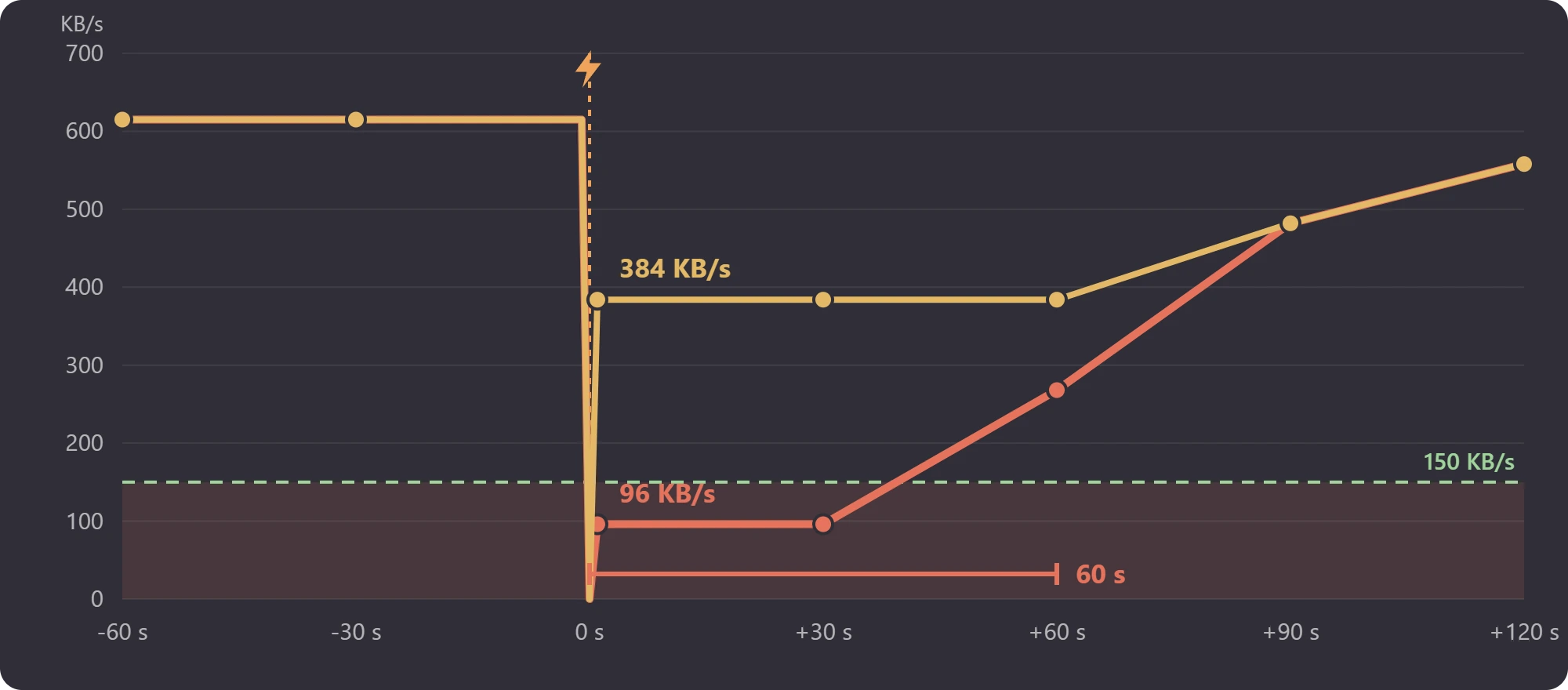
We measured 15 lag spikes like this with the game's own settings. Getting back above 150 KB/s took 60 s in the middle case and up to 210 s. Getting back to the speed before the spike took 90 s in the middle case and up to about 3 minutes.
| Col 1 | Game's own settings | Wikily Servers |
|---|---|---|
| Lowest speed after a lag spike | 96 KB/s | 384 KB/s |
| What players notice | Rubber-banding for a minute or more | Play goes on |
| Direct connection | Add a line to enshrouded_server.json | One switch in the Settings tab |
Direct connection is under Connection in the Settings tab: turn it on and save. The server uses it from its next start.
Our servers are in Gravelines, France, close to players across Europe. A server updates by itself once nobody is on it.
Questions
Why does Enshrouded say Lost connection to the server?
No data reached the game for about 10 seconds, so it ended the session. The usual cause is a connection that loses data, such as Wi-Fi or a long route to the server.
Is it my internet or the server?
On our servers, no player with a ping under 30 ms lost much data, while more than half of the players over 60 ms did. Try a cable and a server closer to you first.
What does useAlternativeP2P do?
It makes players connect straight to the server instead of through Steam's relay network, when their connection allows it. It is off by default and can help with disconnects.
Does Direct connection hide the server from the Join list?
No. The server still shows in the list and players join it the same way.
Why do I rubber-band in Enshrouded?
After a lag spike, the game's own settings let your connection drop to 96 KB/s for a minute or more, below what a player needs. Wikily Servers keep it at 384 KB/s or more. A stable, low-ping line helps too.
How much upload does an Enshrouded server need?
On our servers the server sends each player about 115 KB/s, 150 KB/s in busy moments and up to about 330 KB/s in short spikes. For 4 players that is about 5 Mbit/s of upload, with spikes to about 10 Mbit/s.
Which port does an Enshrouded server use?
UDP 15637, the queryPort in enshrouded_server.json. Forward it on the router and allow it in the firewall.
Enshrouded on Wikily Servers
| Your own PC | Wikily Servers | |
|---|---|---|
| Speed after a lag spike | Can drop to 96 KB/s | Never below 384 KB/s |
| Direct connection | Add a line to enshrouded_server.json | One switch in the Settings tab |
| Location | Wherever your PC is | Gravelines, France |
| Updates | By hand after each patch | By itself when nobody is on |
Enshrouded server hosting from €4.99 a month