[tinypapa] Custom PC Gamer Set

Статистика Мастерской
Всего подписчиков
Текущие подписчики
Всего в избранном
Просмотры
Размер файла
Последнее обновление
Опубликовано
Скриншоты

Описание мода
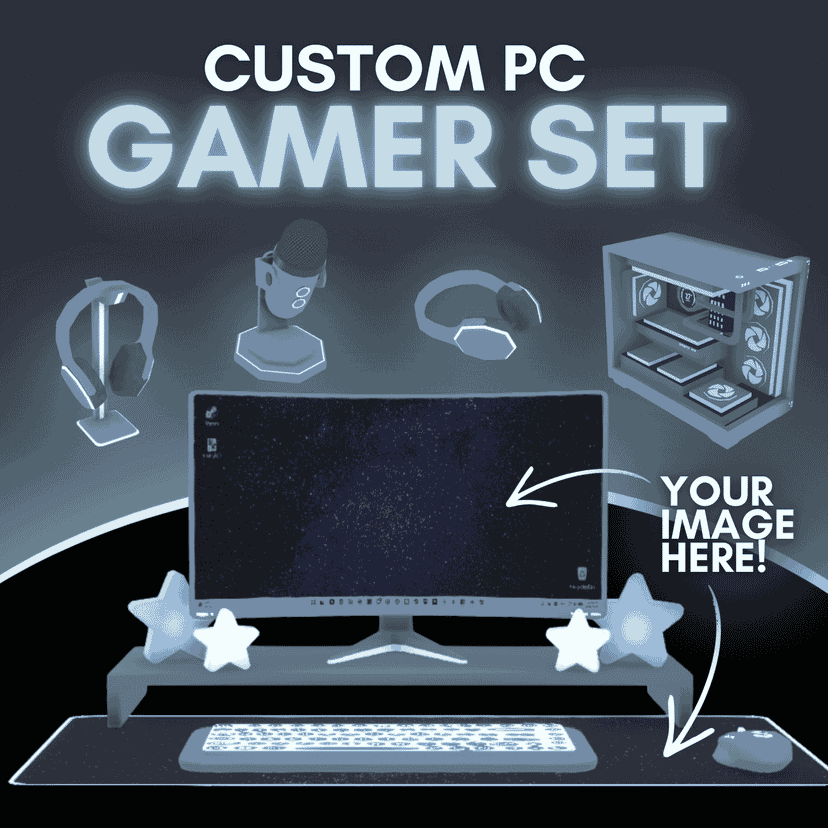
Build the gaming setup of your dreams! This set includes a fully functional custom gaming computer along with matching peripherals and accessories clutter.
This set includes 6 items
✦ Functional curved gaming computer on riser with keyboard & mouse ✦ PC tower ✦ Resizable gaming mousepad ✦ Desktop microphone ✦ Headphones — standing & laying versions
Features
✦ Customizable RGB lighting & base/accent colors ✦ Custom image options to personalize your setup ✦ PC can have your custom screen on 24/7 or be off like other in-game PCs.
Mix and match colors, images, & pieces to create a personalized gaming setup.
More gamer accessories coming in a future set! 💙
Made with ♡ by TinyPapa My mods are and will always be free, but if you'd like to support me or just learn a bit about me:
Написано автором мода в Мастерской Steam и показано на языке оригинала.
Другие моды этого типа
Моды с тем же тегом Мастерской, у которых больше всего подписчиков. Число на карточке - всего подписчиков.