Colourful Emotions

Статистика Мастерской
Всего подписчиков
Текущие подписчики
Всего в избранном
Просмотры
Размер файла
Последнее обновление
Опубликовано
Скриншоты

Описание мода
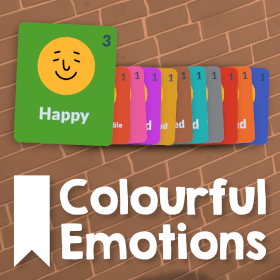
This mod gives every emotion a unique colour so they are easier to tell apart in the UI and on Parafolks' portraits, inspired by the The Sims 4's moodlets and made to fit nicely within Paralives.
All 11 of the base game emotions have a new unique colour
- Happy
- Amused
- Uncomfortable
- Flirty
- Embarrassed
- Disgusted
- Inspired
- Bored
- Angry
- Stressed
- Sad
See the image above for a comparison between the mod's colours and the base game.
The Digestive System Virus, Mushroom Poisoning, and Food Poisoning status effects are also changed so you can tell which Paras are sick. Some status effects like Asleep already have a colour in the base game and aren't changed by this mod.
If you find any issues or have suggestions for changes, please leave them in the Discussions tab on the Workshop!
Написано автором мода в Мастерской Steam и показано на языке оригинала.
Другие моды этого типа
Моды с тем же тегом Мастерской, у которых больше всего подписчиков. Число на карточке - всего подписчиков.