BriCheese's Broken Steam Workshop Example Mod

창작마당 통계
누적 구독자
현재 구독자
누적 즐겨찾기
조회수
파일 크기
마지막 업데이트
게시일
스크린샷

모드 설명
[UPDATE]
The EASY Fix
https://github.com/6xvl/paralives-plugins-index/releases/tag/v1.0.2 Go to this github directory, download the latest release, and install it per the plugin dev's instructions. NOTE THAT THIS IS NOT A MOD, do not install as you would a normal mod - follow the plugin dev's instructions or this will not work.
The MANUAL Fix
For more detailed information about what happened and why this post was originally made - see the below information.
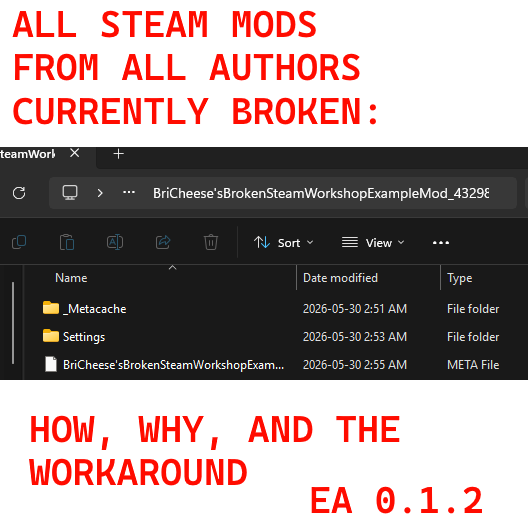
This mod exists purely to demonstrate why and how all Steam Workshop mods for Paralives are broken on the current patch. Do not use this for normal gameplay. For purposes of documentation and transparency - this mod technically changes female Para's default bra to apply both a shirt and boxer textures so that it would generate real files for the purposes of this demo, but are not really the purpose of this 'mod'.
Please direct your attention to the first (1st) image in this mod. This is a screenshot of this mod's file structure as it should exist in the local directory. When a mod is installed in this directory, and the directory opened by clicking its folder looks like the second (2nd) image, your mod will function properly.
The third (3rd) image is how Steam is currently handling Workshop-uploaded mods. The problem here is that this breaks how the game actually loads mods - the game attempts to load mods using the Workshop ID as its highest directory, instead of the mod folder itself. This is what is causing mods to fail to load - this means that, in the virtual file directory that causes your game to load Steam Mods, the mod actually isn't being loaded properly at all.
The fourth image is the workaround - for now, you need to install ALL mods you have downloaded via Steam locally. The most reliable way to do this is to zip the file, cut and paste the zipped file into your local directory, and install it manually - so that it looks like the folders in the first two images. That means NO WORKSHOP IDS in your local directory - you need, for example, "BriCheese'sBrokenSteamWorkshopExampleMod_4329823166651549061.mod" as your top level directory in the Paralives folder located in "C:\Users\[insert user here]\AppData\LocalLow\Paralives\Paralives".
A possible 3rd party open source resource has been posted by another user which I will link here - but I am unsure of its safety or performance and will not be able to verify until morning, so please use it with caution if you choose to do so:
https://github.com/6xvl/paralives-plugins-index
모드 제작자가 Steam 창작마당에 작성한 내용으로, 원래 언어로 표시됩니다.