A Reshade, Without Reshade

Statistiche del Workshop
Iscritti totali
Iscritti attuali
Preferiti totali
Visualizzazioni
Dimensione del file
Ultimo aggiornamento
Pubblicata
Screenshot

Descrizione della mod
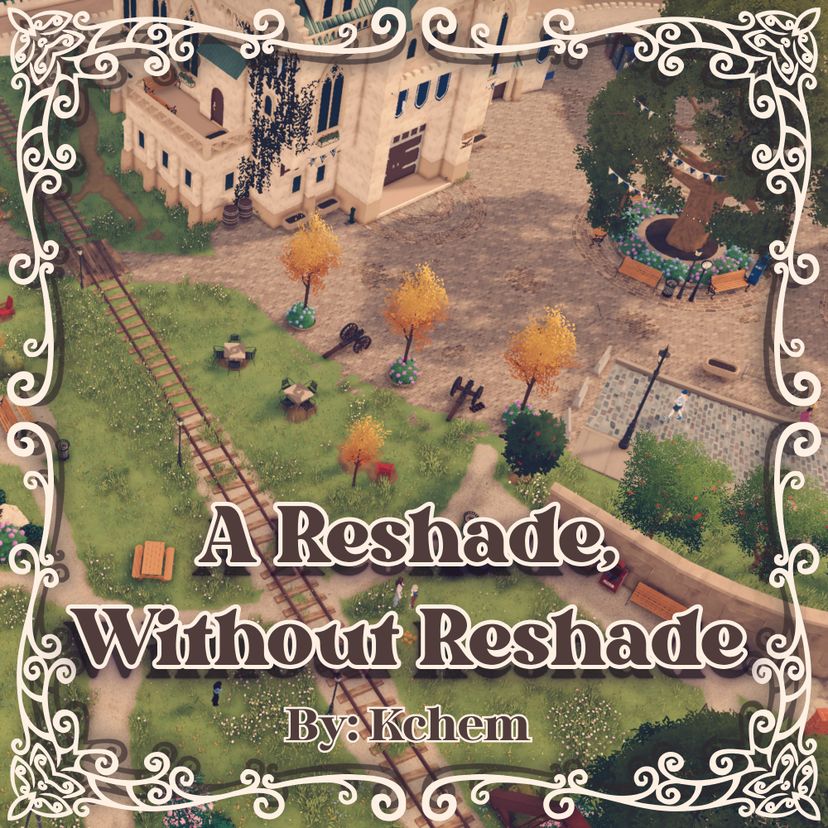
Ever thought the game looked a little gray? A little dull? A little overcast? Me too.
Well, my mod "A Reshade, Without Reshade" is here to save the day!
Enable it under: Settings -> Accessibility -> Color Filter -> "A Reshade, Without Reshade"
I was hugely inspired by the Stardew Valley shader I use called "Dreamy Valley". I made this after thinking about what Paralives might look like if it had a bit of dreaminess. Thankfully, the modding tools in Paralives are robust enough and after trial and error for many hours, I was able to make a Reshade fully inside of a mod! This Reshade is made fully using Post Processing tools in the in-game control panel. That means no external programs needed! Just download, enable, and play!
As this is my first time working with Post Processing in a mod there might be a few times where it's too dark, too light, or too red. Be sure to let me know if anything looks off and I'll do my best to fix it!
FAQ
What happens if I add this to an existing save? Will it break my game?
- No, this reshade can be freely added to your game and will flawlessly incorporate by automatically changing the visuals of your game.
Well what happens if I remove this from an existing save? Will it break my game then?
- Again nope! This reshade can be freely removed from your game as well and the default value look of Paralives will return.
This shader automatically applies? But what if I want to change back to the default look for screenshots?
- You can change back to the default look at any time by selecting it under Settings -> Accessibility -> Color Filter -> Default
Scritta dall'autore della mod nello Steam Workshop e mostrata nella lingua originale.
Altre mod di questo tipo
Le mod con più iscritti che hanno lo stesso tag del Workshop. Il numero su ogni scheda indica gli iscritti totali.