
Builder Statistics
About the Builder
Naturally born Hamburger
Building Specialties
mho's Building Templates
 ユーティリティ
Thick Teleporter Stargate
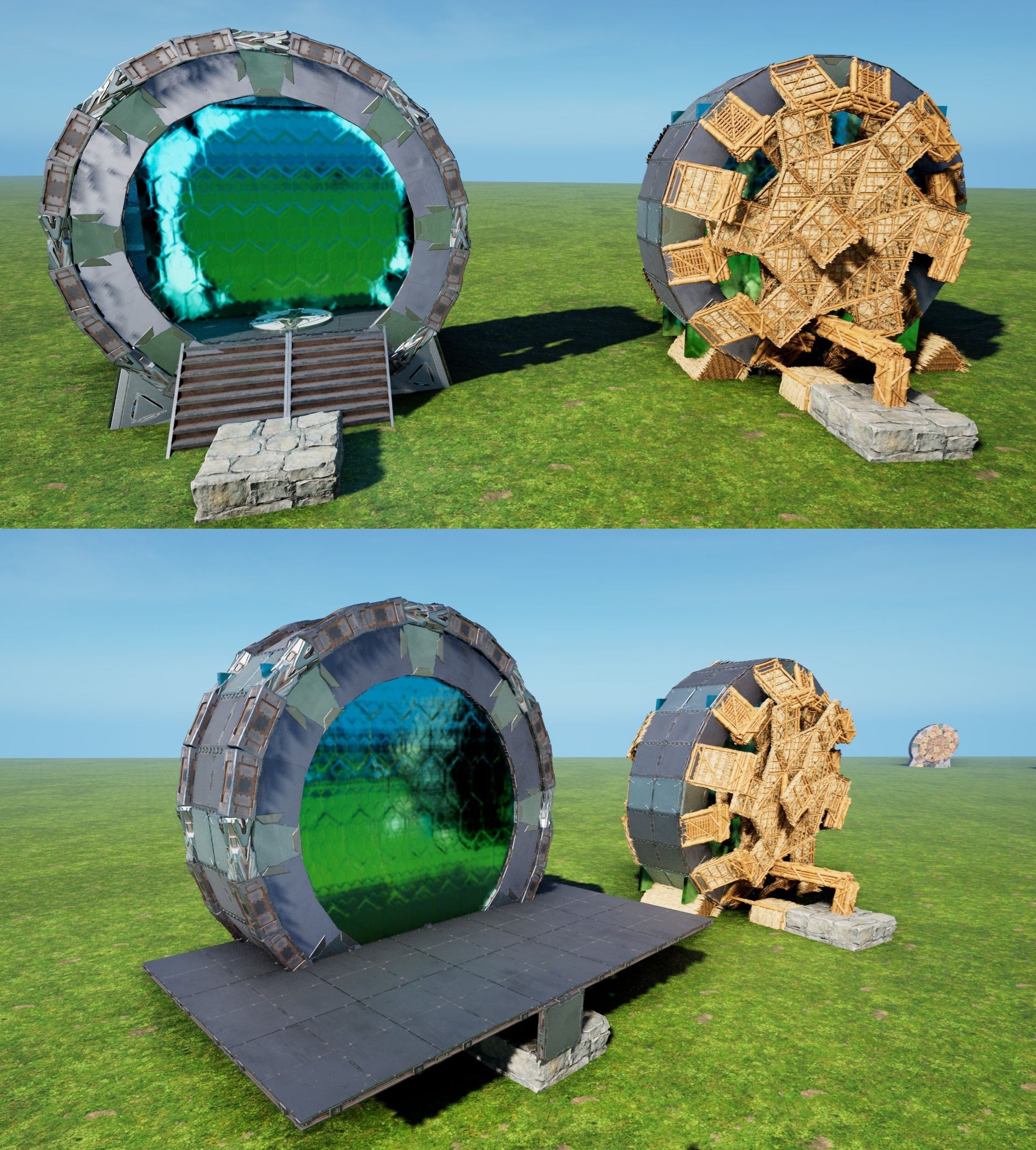
This places a full-Wall-thick Stargate, able to have a small Teleporter inside. I only build this because i thought it would be pretty cool to literally step into & out-of a Stargate for Teleportation! Its functionally the same as the "new Stargate"[wikily 3049], just 1 Wall thick, instead of a Half. This also creates Everything from Foundations, instead of Pillars, to make Placment easier. - I would say, place this just low enough, that the Ring stands fully on the Ground(might be sunken in tho) - The CellarDoors stand on Pillars and cant touch the Ground, so atleast those must be "high enough for their Pillars" [All Pillars are forced into existence by Foundations on this Build(to avoid the annoying "cant place Pillar at this Height" Sweetspots) feel free to experiment, but a floating Gate seems weird tbh...yet it should be able to be snapped/build pretty high, if you want it in/on a Ceiling!... and ofc a floating Ring needs some Ground-contact, like adding an extra smallFoundation or something] - remove all Thatch Foundations & Ramps and the Scaffolding will just peel-off - Fill in the missing lowest Walls & Ceilings[use the right Flip on the TekCeilings, or the "Chevron" outside will be darker then the rest] - To fill the Gate's Floor, Add 4 quarterCeilings & 2 Ceilings onto the central Pillar - Add 4 Stairs (on the quarterCeilings) and a Teleporter - Fill the outer Rim with Pillar-Beams to your liking and to cover-up most of the Gate's "Ears" - use whatever cover-up you like to hide the Gate's lower end (i prefer TriangleCeilings+Wall, but up to YOU) ...AND YOU ARE DONE! PS: Like the newStargate, the "Floor" is just half a wall higher then the CellarDoor/StoneFoundation & could also be used to make the Gate "Part of a Ceiling" Enjoy & expand the Gate Network ;)

 装飾
装飾OceanPlatform Fisher
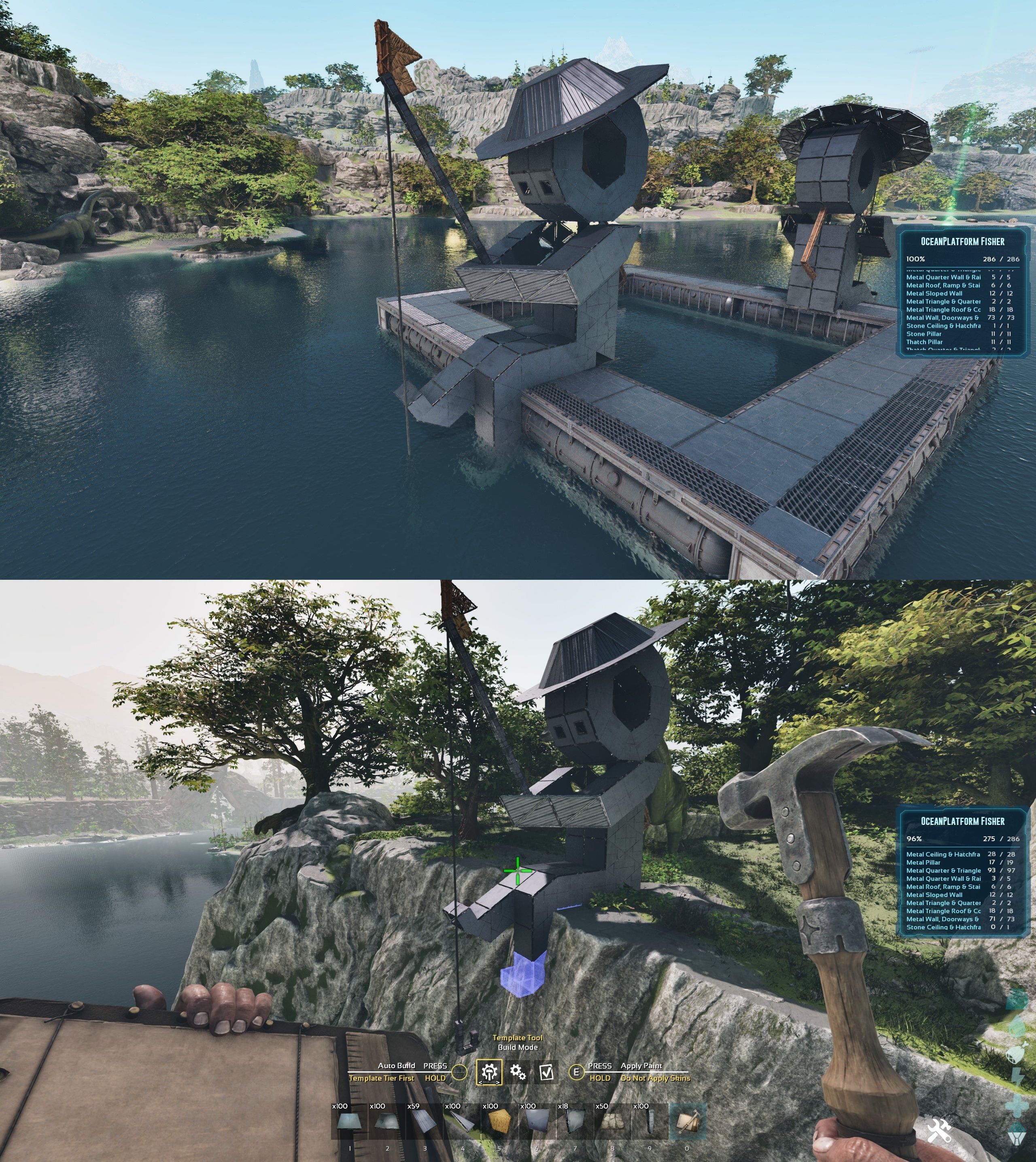
This places a Fisher Statue with Hat, Rod & Hook ... anywhere really! (i build 4 on Official by Hand so far, since Extinction came out, but this is the cleanest/most universal Version yet & it just seemed worthy enough to be the first Statue i will release!) - I made this to be snapped to an "north-turned/inward-pointing" Ceiling on an OceanPlatform (if you want to glue this to another side, just turn the Ceiling with a small PillarBeam[see Screen]) if snapped to an outward facing Ceiling on the Outside, he would fish in the Pool! [Platforms are basically giant Foundations, so when you place one in front of You, its north-turned] - to finish this, just remove all Thatch & fill the missing Ceilings & Walls [i build this fully with "SecretDoors", since, like any "Door", they can be walked on! i recommend doing the same, so no1 can get stuck!] - the Pillars under the Knees & Beams under the first Leg-Ceilings connect the Fisher to the Platform - all Foundations are only added so his builds flawless on real Ground! ...you can remove them when build on the Platform - If you want to place it on Ground, just create a Line of DEEP Foundations, facing away from whatever Cliff/Edge you want the Legs to be. The SnapCeiling is in/under the "left Buttcheek", soo you need like 3-4 DEEP Foundations Distance from the Edge...And i mean DEEP! You want the Legs to sit on the Ground & not hover after all! - The Hammer might not build all, but YOU will be able to! also, you could add some extra Support in the downward hanging Leg, that will enable you to make the Fishingrod 1 longer & also gives more distance between the Line & the right Foot this one is just limited by the Platforms Reach PS: the smallPillar on top of the Rod is needed to hold the Line & cant be helped, just Skin it "Glass" & its basically invisible Enjoy!
 ユーティリティ
Vertical Dedi-Plate Starter
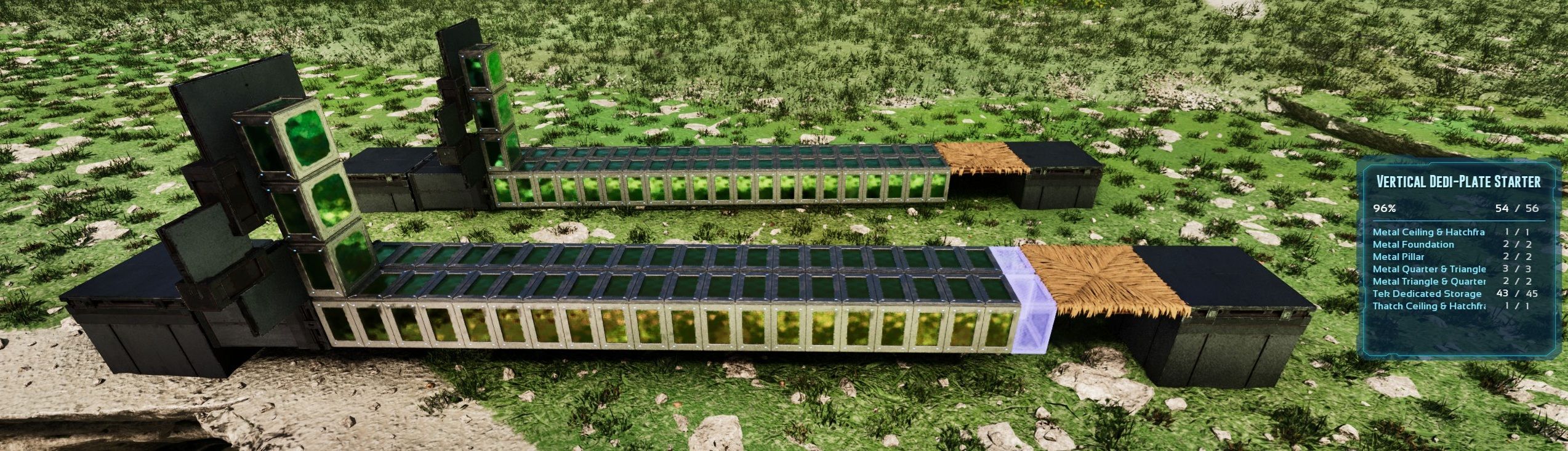
This places two 90° smallFoundations with 42 Dedis (equal to 6 Ceilings) in front of a normal Foundation, thats lowered by -8 to give it all a flat Surface (and the 90°Foundations and Dedis can still be covered up by Ceilings&Cellar-Doors) - one 90° Foundation is used to offset a Ceiling by 1/4 upwards & to the side now a Dedi snapped to that Ceiling can be used to park Dedis centered on smallCeilings or Foundations(well or 4 on 1 Ceiling, i guess) - every dedi-stack/line needs a Ceiling or Foundation to start, thats why i build this in a way, that these can just be snapped in a row to expand easily - these Dedi-Stacks dont seem to need Support, but cant touch the Ground or other Buildingpieces around on placing (thats why i just added a Thatch Ceiling at the End, as "Marker") enjoy
 基地
基地Oval OceanPlatform Hangar
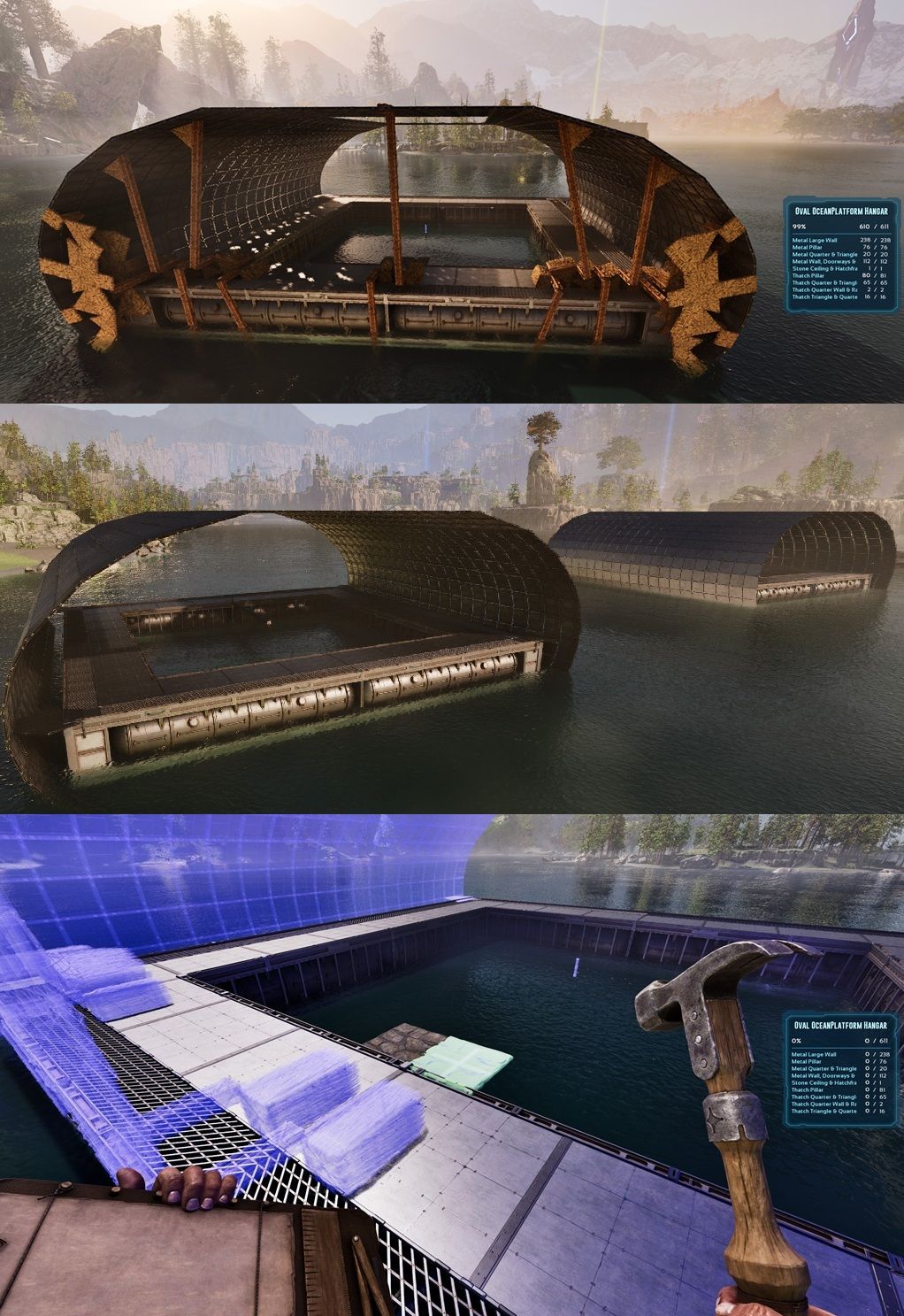
This places a 24 sided Oval over&around an OceanPlatform & basically turns em into a Hangar I build this because its possible & because the Oval and the Platform just fit together effordlessly...which, is beautiful imho! - place a "north-turned" Ceiling "left of the Center" inside the Pool & snap this Template to it [OceanPlatforms are basically giant Foundations, so when you place one in front of you, its "north-turned"] The Scaffolding will build a Wall-Ring with Pillars (outside) on both Ends. These will keep the Oval intact & the Rest is just filled with large Walls The 4 Hexagons on/in the Corners are offset by half a Wall and connect the Platform and the Oval with Pillars! (19+2Hexagons is the Ovals Diameter!) - remove all Thatch...id say, disconnect the Oval first & keep the Rest of the Scaffolding till the End, u never konw... Thats all for the basic Build! If you want to close it, id recommend placing quarterCeilings inside the Oval, then you can just use the normal(and sloped)Walls from the Platform to "cut into them" and close it all there might be some small "Wall-Ears" visible outside, but a Glass skin would fix that [it IS possible to avoid these, but that comes at the cost of MANY Pieces & Complications, YOUR Choice^^] OFC You could also place multiple & turn like 4 of them into one HUGE Hangar! And lastly, as you can see on the Screen, if you have enough flat-Ground to "simulate a Platform", you can just DoubleClick a Foundation somewhere and build a Hangar on normal Ground! YOU just need to tinker a bit, but all the Pieces are there and i even added some convenient extra Foundations & Pillars for this Use-Case! PS: The lonely Pillar in the Center is just the "Grab-Point" for the Template (ignore it) Enjoy
 基地
基地Tetraeder Toolset
Tetraeder Creation Toolset These 2 "Tools" are all YOU need to create 70.5° Tetraeder's ANYWHERE! (4 sided "Pyramids" build from ONLY Triangles) - Just build a Triangle at whatever Size you want(up to around ~50,then you reach the max Height limit in ARK) - Use a small Wall (to guarantee snap Direction), glue the 70.5° Flipper to it & build the one Foundation, that has the "Floor" facing outward - Add some Triangle Ceilings to that Foundation & catch the Angle with a (thin)Pillar !!![make sure there is NOTHING above the Pillar on placing & it doesnt touch the Foundation, or you might end up with a "not-Foundation" Pillar]!!! - Add a (thin)Beam to the 70.5° Ceiling to glue the Floor & the Angle together (Pillars placed on the 70.5° Angle will be "invisible" and give you a smooth outer Wall without Bumps!) - Do that for all 3 Sides(or the 6 Corner Sides) and you got a Tetraeder! To add Floors use the "Tetraeder Floor-Creator" (up to 25 Floors Height... was limited by the Hammers reach!) - Choose any Side & add an Foundation "L" (or whatever) you need a "north-turned" Snappoint, so just add a small Pillar Beam to a Foundation & that will give you the "forward/North-turned Snap" ...the more distance you give this, the easier it is for the hammer to actually find the right snap... (see Screen) - Place normal Pillars on the Scaffolding until you reach the desired Height & add a small Wall, that will allow you to place Ceilings "Inside" - Use thin Pillars on the 70.5° Sides as Glue to hold the Floors (i would glue them into the Corners, but up to YOU ofc!) - Remove all Scaffolding Fill/close them however YOU like, just know, since its ONLY Triangle Ceilings, the Numbers add up QUICK! To close the Gap between the Ground and the Floor, you can snap ramps to the 70.5° and use "Triangle-Roof-Corners" to close this perfectly (like its made for This) I have one standing around my Well on Ragnarok for over a year now & its just n0ice, i think! PS: choose ONE Floorplate(Orientation)! ... for example: a "north turned" build triangle floor cant/wont connect to "different turns" of Triangles, thats why i didnt release "Tetraeder Corners", the 3 Floors wouldnt want to connect without extra Pillars, soo try ur best & keep it all "ONE BUILD Direction" to avoid support issues! Enjoy building YOUR own 70,5° Tetraeder's!
 基地
基地24 Ribbon Base Barebone
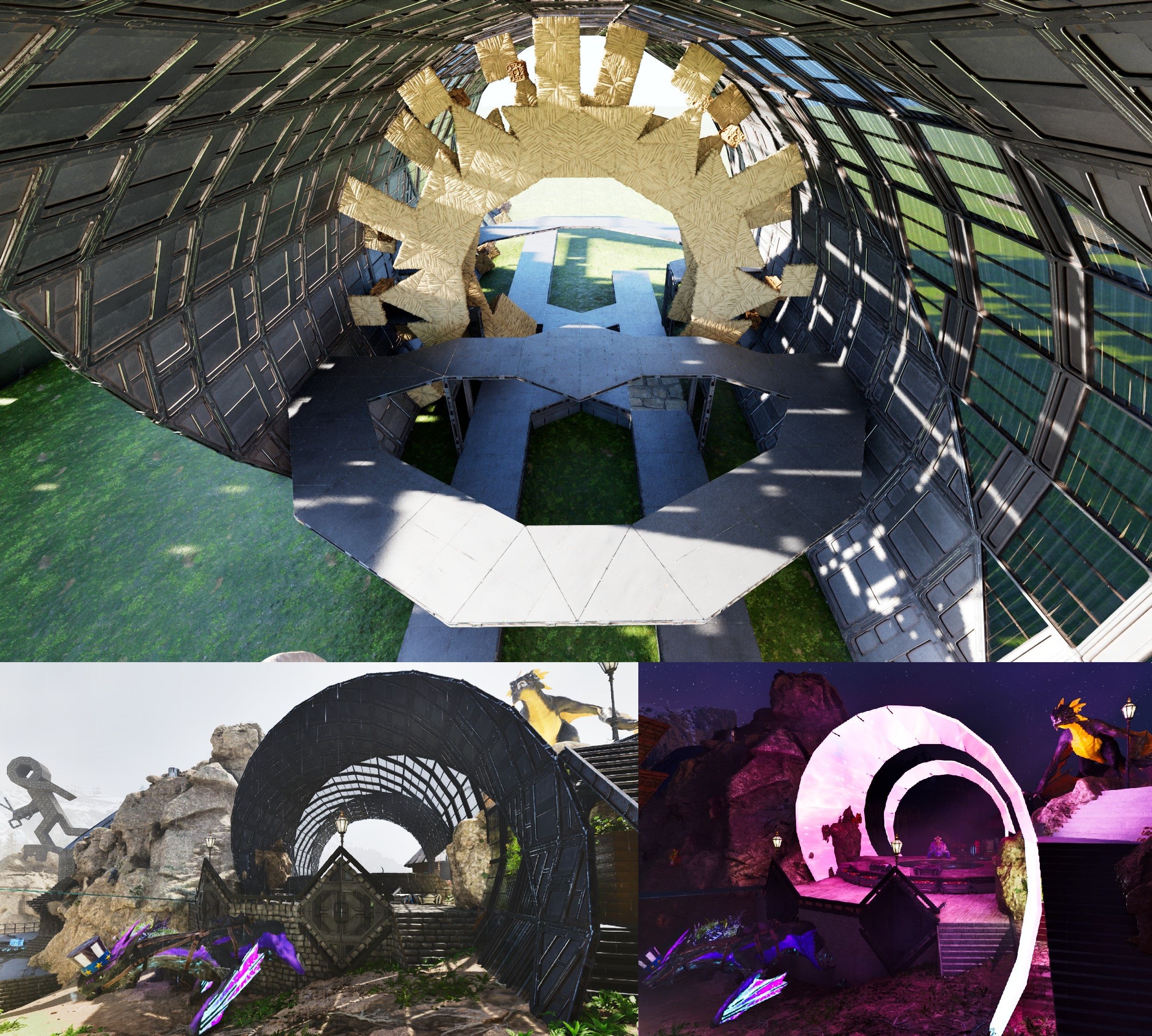
This creates a 24 sided Base-Ribbon from 2 foundations who build everything "clockwise" [2x 12sided circle plates] - remove thatch, THATS ALL u need to do It was Originally designed to be "placed deep" so that the last walls are sunken in and being purely held up by the normal foundations & therefor relies on the connection between the ring & foundations to stay up! That being said, i added pillars on the lowest walls ends (8 overall), that can keep the loop standing alone (for 99.99%, if placed high enough ofc ... see screen) there are 2 pillars for each "circle side", on the sloped walls, who glue together 6 walls. if you want to skin a pillar or something, feel free to remove some walls to touch a pillar, just keep the "grid" intact! - if you want to "get foundations back" from an empty loop, do what i did: "pull down any of the circles sides to the ground & use my 'foundation flipper' to get them" - ceilings from the foundations will just regognize the 90° walls on the "left&right" as normal & connect with them, wich means they will hold this entire loop! (as long as we keep that connection alife) ... this also means we can replace a 90° wall witha normal one, for a door, or something! |Building examples: - all foundations & ceilings i placed are ONLY SUGGESTIONS! (and support, i guess) we can fill this loop however we like after all - if you want to "stay with it" just use a "24" sided circle or pill-shape inside as floor to make it part of the loop [as the template has] then you can provide extended support for the loop & make your floor tightly fit - another solid option is to just fill "both ends" with a 12er-plate & skin those with glass or water, to have a full closed interior & just use a ceiling-door to replace one of the lowest walls on the ring as entrance (see last screen) [the small "ears" outside cant be helped...but skinned!] PS: Greenhouse Walls will provide 300% i think thats all Enjoy!
 装飾
装飾new Stargate
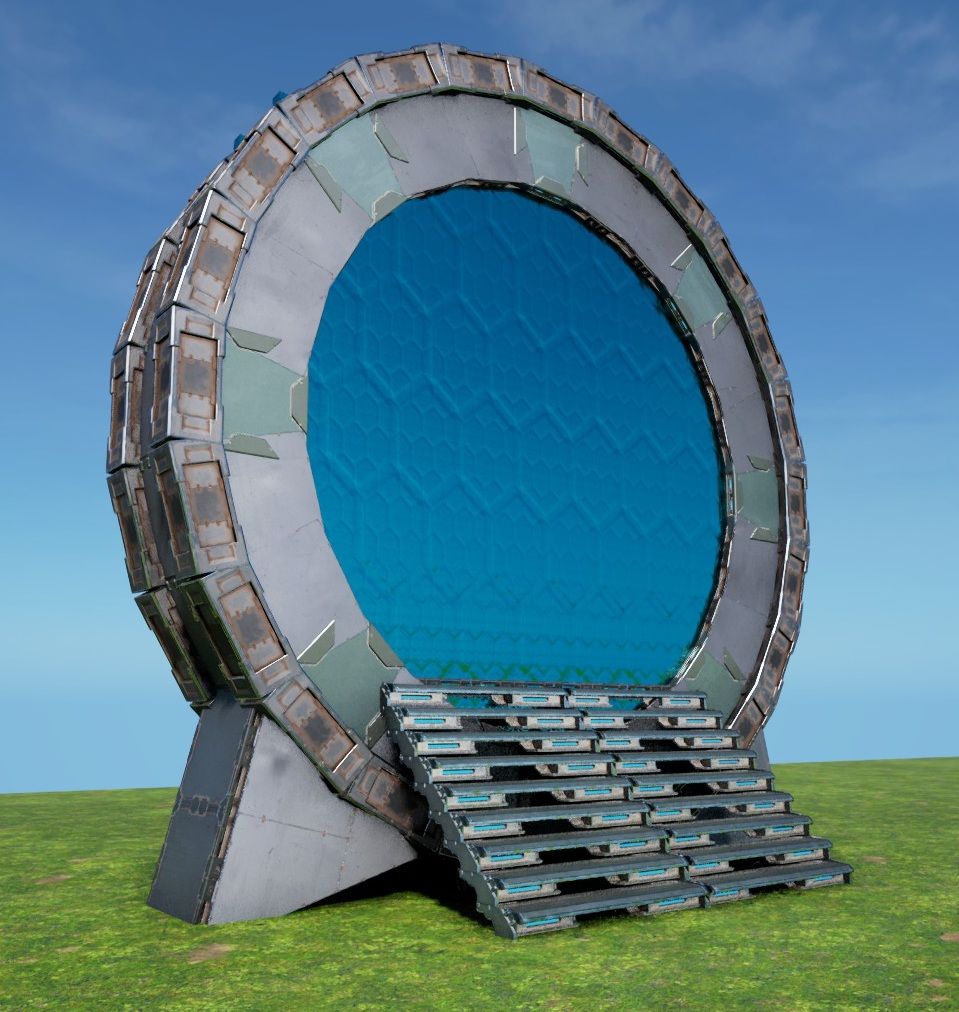
The new Stargate This places a vertical 24sided small-Wall Ring with two Tek Cellar Doors "inside it" (-16 offset) to mimic a "true 9 Chevron Stargate" ! It only took me around 11 Month to get this right again & into an easy instant-build Template, after Wildcard made all "inner-Arches" illegal over the last Year... this one just doesnt use inner Arches at all now & works - just place it low enough that the 2 lowest Pillars in the Ring are ontop/above ground (those 2 will build the entire circle for YOU!) you could place it higher, but then the Gate would start to float, wich looks weird tbh - remove all Thatch get rid of the Ramps & the Scaffolding will just peel off ... the 3 small Foundations just force the Pillars for the CellarDoors & Stairs into existence! - finish the Ring by placing the missing lowest side (Wall, 2 Ceilings & a PillarBeam) these are missing, so this can only build itself correctly! - add a small Stair "in the Back" and cover the Ring's "floor" with 6 small Ceilings [see Screen], so no1 can fall into it & get stuck. Now place the missing Stairs & 2 more down the other Side - Fill the outer Rim with small Pillar Beams (cant leave them in, because of the 40-Piece limit...) - the Triangles on the Sides are only there to cover-up the lower Parts of the CellarDoors, replace them if you want to, or find a better cover-up, they are of no consequence for the circle! Thats it! PS: if you really want to, i guess it could be possible to integrate this into a ceiling floor & have it look like the "round Stone Portal" on ceilings ... its a bit tricky, but the foundation in the front & the stairs in the back, could be used to have this "inside a base", but its not designed for it! [the foundation is just positioned below the cellar door,like on all my gates so far, so the ceilings from the stairs are just "half a wall higher" inside the circle] Enjoy an ancient Alteran Marvel of Engineering in YOUR Base!
 基地
基地New Chapel Arch
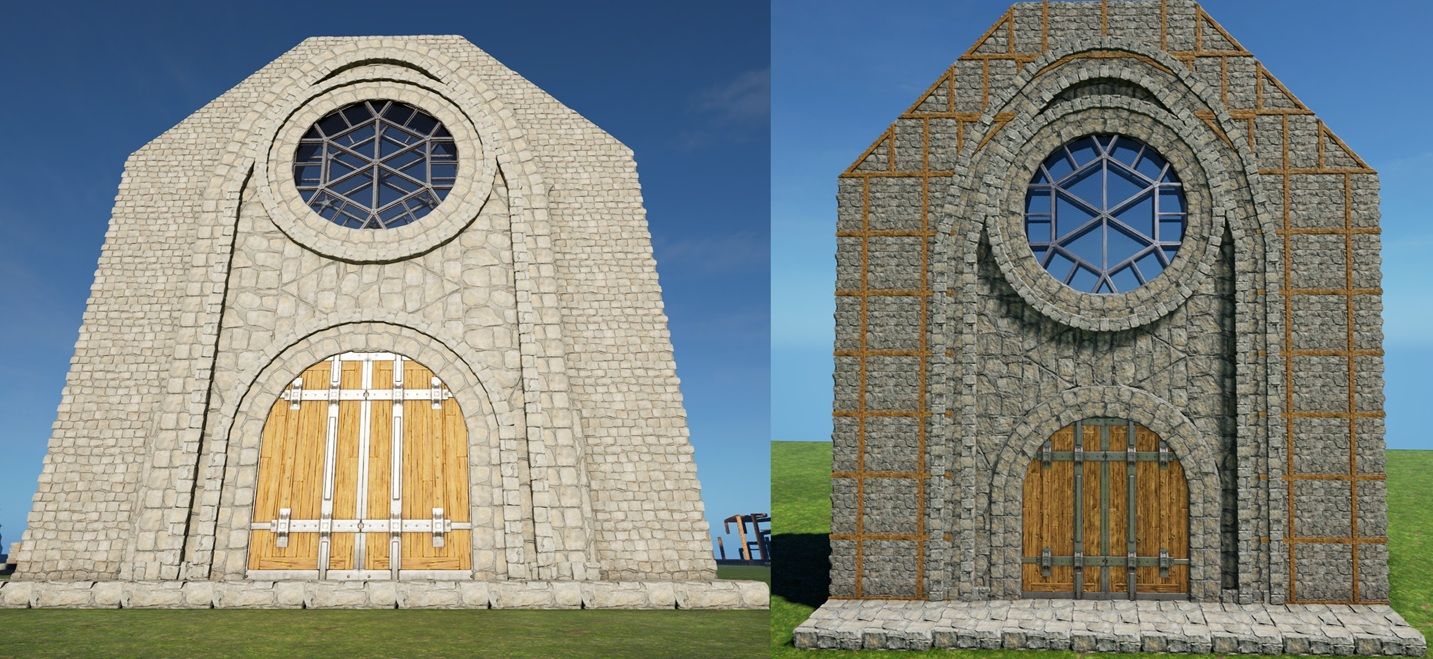
The New Chapel's Arch This build replicates the "Front Arch" i build for my Chapel at the end of 2025, but they patched it impossible and i never released it, so now i made THIS one for you all! The Gate-Arch, Window-Ring & outer Arch are one Build The CellarDoors & "Wall"Ceiling Plates are offset by -16 "inside" Which makes this 3 "independent" Builds with separate Support! (this could be all fused into one, but it would require a whole pile of offsets & supports, which dont make sense to have really) - Place this like any foundation, or glue it into any 7-9 gap in a wall (leave the central (north turned) Foundation & snap this to it) - Make sure its placed low/high enough that the 8 essential Pillars see Ground (see Screen) , the 4 lower ones should be barely off the ground & the 4 higher ones will be created by the Thatch Foundations, but need to end up "low" enough so they become Foundations! this will also make sure that the Scaffolding "outside" is at the right Height! ...some small Pillars below the Cellar Doors will not auto-build, its "normal", thats why they have 4 - Remove all Thatch (disconnect the Ramps from the "Rings" first, leave the Scaffolding till last, just to be sure) - Fill the Ring & Arches on both sides with small Ceilings (and the 1 wall ontop of the window ring!) - Fill in the front & back "WallCelings" and the Windows - If you want to close/attach the normal Walls, you have to remove the outer small Walls on the big Arch (see Screen) & let the Walls "cut into" the Arches ceilings now replace the Arches small Walls - As with the other Gates, just use Foundations to cut through the Arches "Feet" - Fill the Arch/Ring/Gate with PillarBeams as much as u like & to close evtl Holes! Fully decked-out this Build can end up at around 650 Pieces PS: you could use the Arch itself as "Roof", but it would cost 14 small & 6 normal Walls just to have one Foundation length covered, that adds up quick!^^ Enjoy
 ユーティリティ
48 sided Anywhere Circle
The 48 sided Anywhere Circle This allows us to create a 48 sided Circle ANYWHERE! And i mean anywhere!, any hillside/mountaintop/over canyons/underwater/wherever ... all this requires is around 3 foundations worth of space & any form of temporary support, large enough to let this ~15 diameter ring autobuild itself! - just place a foundation wherever you want this circle [looking in the direction, where you want the circles center] & snap this template to it (just make sure you have the extra space for the 3 thatch foundations/angles next to it) ...welll and the extended/temporary support build for the ring!... - i used 9x11 foundations on the screen, but you can support this however you like ofc! (it doesnt has to be pretty, its just "scaffolding" , as you can see on the "cliffside screen") - now pull down the walls & catch them with pillars or foundations - if you want it to be all one build, you need to add pillars on/or below each wall corner anyways, so all sides will be connected - pick up all thatch & the "dirrty support" you build for the ring - choose any of the four "triangle circles" as floor plate , just build a ceiling (with clean foundation/pillar support) over the entire ring & afterwards build the walls "through" the floor, that way you have a closed outer wall & a legit/standard floor (there are some ceiling corners visible outside, but its the best we can do without "getting fancy") - or just build a square plate of ceilings, i guess... - if you wanna be fancy, use my foundation stacker & lower your floorplate by -16 (so you can stack ceilings) then you can have a fully smooth outer rim/look & hide your floorplates pointy/uglyness inside, under a rim of small ceilings on your rings walls (like i do in my base & how the 48sided House-Template is designed to do) its also the exact same mechanic/stack i build by hand to create the "48 sided Round Ocean Platform Pool" ! [Four 12 sided triangle circle plates & i just place 1 central wall for each side] i honestly got tired of having to rebuild this whole thing, every time i wanted to build on an interesting spot, so i thought "ill do it ONE LAST TIME" & here we are! ...truly hope to see more rounded bases on the arks!... enjoy
 基地
基地Arched Ocean Platform Gate
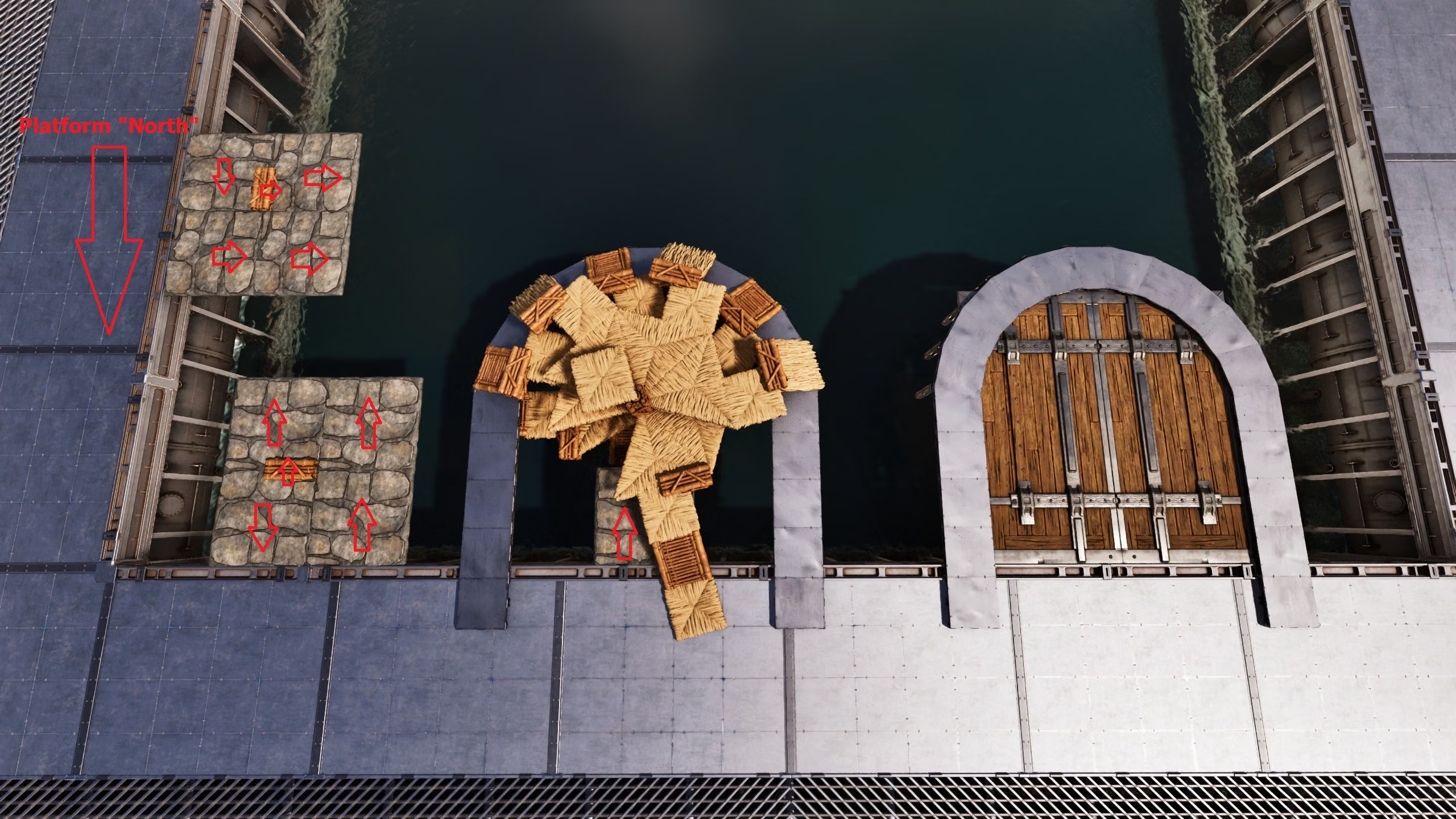
> Experimental! < This places an flat Arched Gate onto any OceanPlatforms Pool-sides (with 16 heigh offset, so a normal cellar door can just be glued to the platform) - its designed to be glued to any inward(north) facing ceiling! - if you want to place it on "the other sides" , just add a ceiling & small pillar, it will give you the right orientation! (see screenshot) !!! weirdly enough, the platform seem to support this build, even tho its unconnected to the platform itself & only held up by 2 small foundations at the end of the arch!!! i tried it on official & it builds flawless, stays up & is fully supported! ... i have no explanation as to WHY, but it works & stays up, sooo here we are :) PS: this is kinda experimental & if it should crash on you/not work, so be it... i plan to do a "legit supported" version (wich is kinda a pain to archive on this one), but until then this seem to JUST WORK! sooo i guess, enjoy it while you can! ... if you wanna be cool, let me know, if it works, either here in the comments, or in discord!, feedback would be much appreciated on THIS one!
 基地
基地round Stone Portal + slim version
A round Stone Portal ...creative name , i know .... This places most sides of a 24sided small wall triangle circle, sunken into the ground to ...well, look fancy ;) >>> to my dismay i must admit, i didnt test this on official, because its such a simple build, BUT ofc official & its dumb "40 pieces in an area-rule" made this a "broken" template & since the game doesnt allow me to give you a fully done portal, i made a SLIM VERSION without pillars !<<< ...sry.... you can ofc snap this to existing foundations, but to get the best look, id say, place this by hand! & build your wall from there, otherwise you might have "holes & such" visible - to get the best result, place this low enough, so that the horizontal pillar-beams just barely dont touch the ground - if placed lower, some of the lowest walls/ceiling/pillars might not autobuild, but the scaffolding exist, so you will be able to build these "missing" pieces by hand, even if the hammer doesnt (the fully build one on the first screen does not use the lowest sides either btw! but, if wanted/placed high enough, you could) - remove all thatch - add the missing horizontal pillars on the ground & those on the outer small walls (if i leave those, the pillars in the circle are blocked for the hammer) [if you use the SLIM VERSION, you have to add all the pillar beams on the inner & outer rim, because wildcard has issues with more then 40+ pieces in an area...] feel free to choose if you want to have foundations in the pathway or not & you could also fill the circles floor itself with small foundations, by offsetting them with a small pillar by 1/4 (as you can see in the screenshot) hope YOU enjoy it
 基地
基地Arched Double Gate
The Arched Double Gate This Places 2 Cellar door Gates inside the Gate Arch (16 offset"inside" , since we can no longer fill the inner arch with walls (thx wildcard -.- ) just like the other "arched gate", - all you need is a "5 gap" in foundations, just leave a central foundation (turned north-outward) & snap this to it! place it like any foundation! just make sure its low enough, that the small pillars on the ends see ground & everything thatch can be placed - remove all thatch - now the foundations can just "cut through" the outer arch! - to fully close it and make it one with a wall, add some small walls & pillars on the sides, since the distances are not full walls the picture is from the original version, before wildcard decided to make the inner arch walls illegal, but its the same arch... PS: you can always replace the 2 gates on this one! just remove some foundations, so you can touch the pillar beams, holding the gates! enjoy your double gates